#Thanks v-shop
Thanks to the author of v-shop for his selfless dedication, and I also hope that the author can add support for WeChat login, WeChat automatic registration, and WeChat payment support in the main project
**v-shop****’s open source address:**
[https://github.com/JoeshuTT/v-shop](https://github.com/JoeshuTT/v-shop)
[Code Cloud Mirror:] [https://gitee.com/joeshu/v-shop](https://gitee.com/joeshu/v-shop)
You can follow the author's project homepage and follow the author's latest updates
# v-shop code adjustment
## Interceptor adjustment
src/common/request.jstoLogin method adjustment:
```javascript
let _domian = 'http://' + document.domain + '/login?redirect=' + router.currentRoute.fullPath
_domian = encodeURIComponent(_domian)
if (!window.goLogin) {
window.goLogin = true
Axios.get(window.subDomain + '/site/statistics').then(res => {
// console.log(res.data)
parent.location.href = 'https://open.weixin.qq.com/connect/oauth2/authorize?appid=' + res.data.data.wxMpAppid + '&redirect_uri=' + _domian + '&response_type=code&scope=snsapi_userinfo&state=STATE#wechat_redirect'
})
}
```
The APPID of the official account configured in the background can be obtained through the /site/statistics interface;
Combined with the relevant instructions on web authorization of the WeChat official account, perform an authorization jump and obtain the code;
## User registration based on code
src/pages/login/reg.vue
```javascript
async register(code) {
const res = await this.$request.post('/user/wxmp/register/simple', { code })
if (res.code !== 0) {
this.$toast(res.msg)
return
}
let _domian = 'http://' + document.domain + '/login'
_domian = encodeURIComponent(_domian)
this.$request.get('/site/statistics').then(res => {
parent.location.href = 'https://open.weixin.qq.com/connect/oauth2/authorize?appid=' + res.data.wxMpAppid + '&redirect_uri=' + _domian + '&response_type=code&scope=snsapi_userinfo&state=STATE#wechat_redirect'
})
}
```
## Automatically log in users based on code
src/pages/login/login.vue
```javascript
async login(code) {
const res = await this.$request.post('/user/wxmp/login', { code })
if (res.code === 10000) {
let _domian = 'http://' + document.domain + '/reg'
_domian = encodeURIComponent(_domian)
this.$request.get('/site/statistics').then(res => {
parent.location.href = 'https://open.weixin.qq.com/connect/oauth2/authorize?appid=' + res.data.wxMpAppid + '&redirect_uri=' + _domian + '&response_type=code&scope=snsapi_userinfo&state=STATE#wechat_redirect'
})
return
}
if (res.code !== 0) {
this.$toast(res.msg)
return
}
util.storage.set('token', res.data.token)
util.storage.set('uid', res.data.uid)
this.$route.query.redirect ? this.$router.replace({ path: this.$route.query.redirect }) : this.$router.replace({ path: '/home' })
// this.$toast.clear()
this.$toast.success({
message: 'Login successful',
duration: 1500
})
}
```
## WeChat payment support
src/common/pay.js
```javascript
export function wxPay_jsapi(money, nextAction, payName, remark = '', token) {
return request.post('/pay/wx/jsapi', { money, nextAction, payName, remark, token })
}
```
## Initiate WeChat payment on the page
public/index.html
Increase globalWeixinJSBridgeComponents
```javascript
if (typeof WeixinJSBridge == "undefined"){
if(document.addEventListener){
document.addEventListener('WeixinJSBridgeReady', onBridgeReady, false);
}else if (document.attachEvent){
document.attachEvent('WeixinJSBridgeReady', onBridgeReady);
document.attachEvent('onWeixinJSBridgeReady', onBridgeReady);
}
}else{
onBridgeReady();
}
```
On the specific payment page (currently order list and order details), call payment:
```javascript
wxPay_jsapi(amountReal, '{type:0, id:' + orderId + '}', 'Online payment', '', storage.get('token')).then(res => {
if (res.code === 0) {
this.$toast.clear()
window.WeixinJSBridge.invoke(
'getBrandWCPayRequest', {
'appId': res.data.appid,
'timeStamp': res.data.timeStamp,
'nonceStr': res.data.nonceStr,
'package': 'prepay_id=' + res.data.prepayId,
'signType': 'MD5',
'paySign': res.data.sign
},
function(res) {
if (res.err_msg === 'get_brand_wcpay_request:ok') {
// this.$router.replace({ path: '/order-detail', query: { id: orderId }})
parent.location.reload()
}
})
} else {
this.$toast(res.msg)
}
})
```
# WeChat payment configuration
**MA authorization, authorize your WeChat payment to be used by your service account**
["**WeChat Payment MA Authorization**"](https://www.yuque.com/apifm/doc/zrui8q)
**Log in to the WeChat payment backend and activate JSAPI payment:**
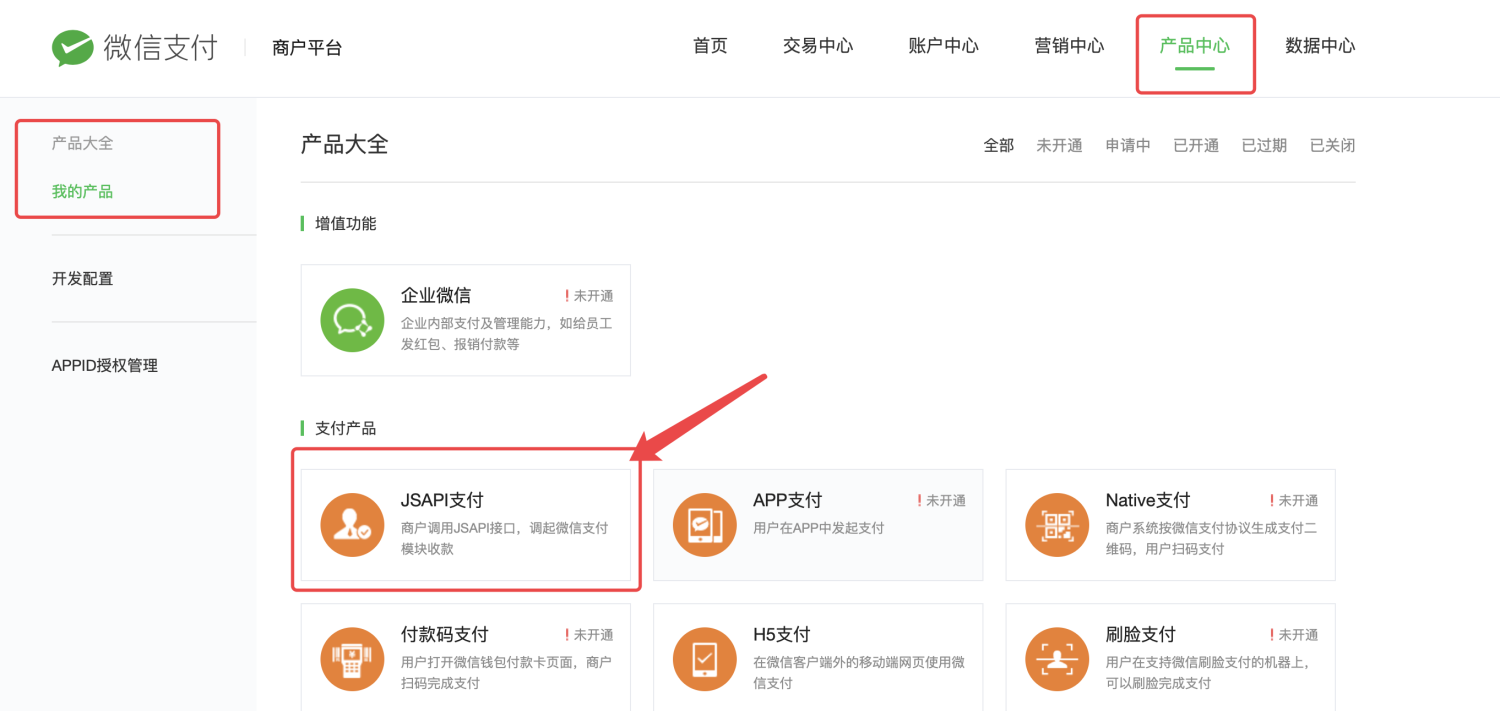
**For public account payment, if you need to configure the payment domain name, configure it in the development settings as follows:**
By clicking on the image above, "Development Configuration" on the left menu, then configure as follows:
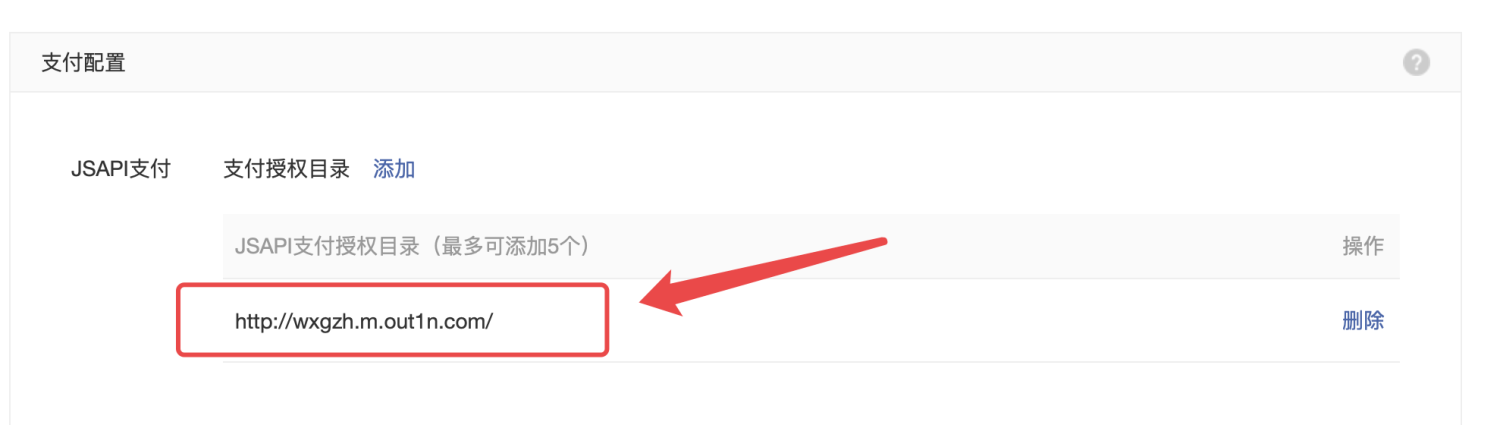
Please configure the domain name of your own h5 mall truthfully
# apifm background configuration public account information
Left menu "WeChat Settings" --> "Official Account Settings"
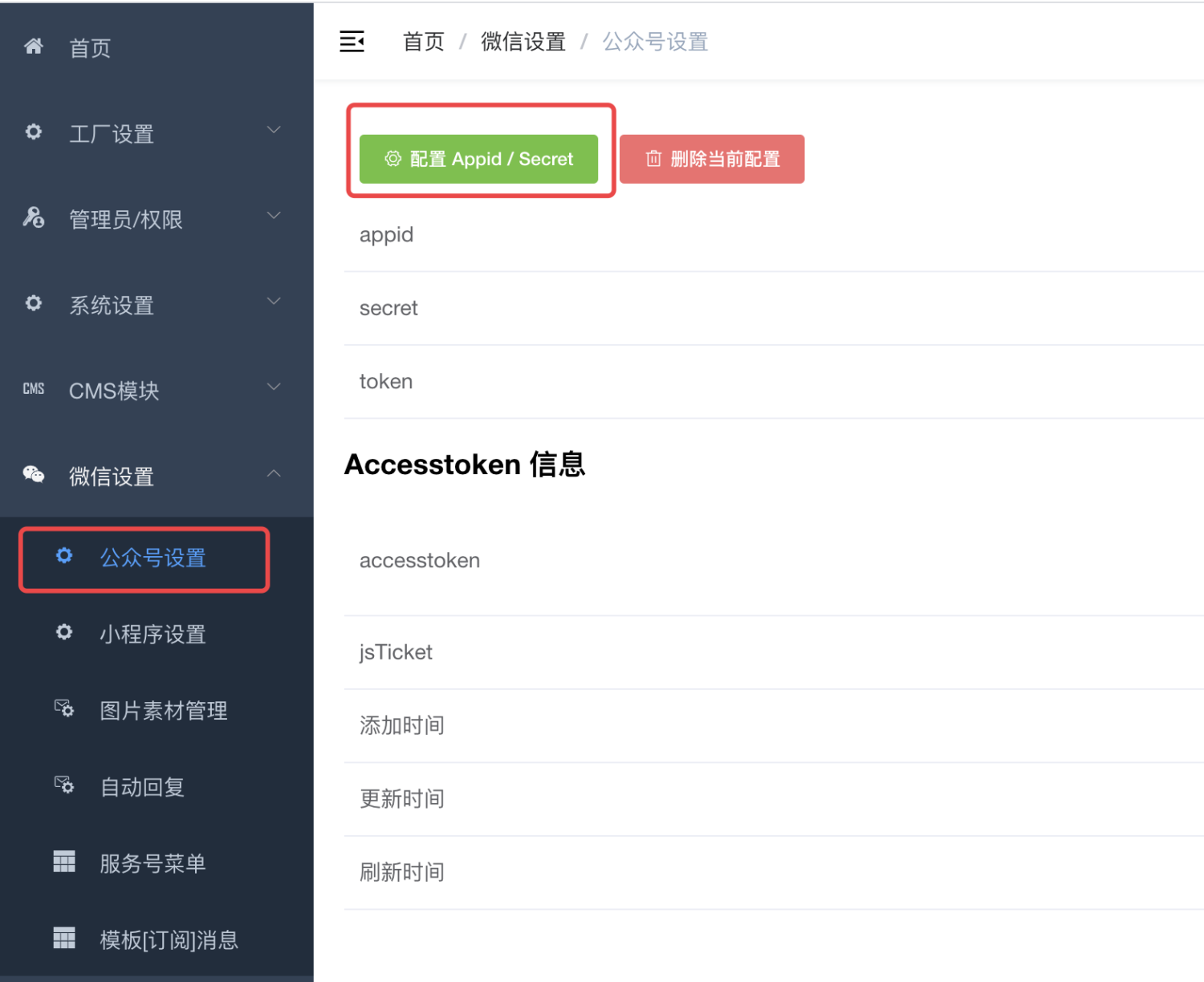
If the above menu does not appear, please enable the "WeChat Official Account" module through the left menu "Factory settings" --> "Module management", and refresh the background with F5 to display the menu.