# Activation method
Log in [https://admin.it120.cc/](https://admin.it120.cc/) backend, left menu "Factory settings" --> "Plugin management", purchase and activate the "Card Code Automatic Shipping" plug-in
# Add card secrets/QR codes in batches
Click Product Management --> Card Code Automatic Shipping Settings

Add or upload card passwords/discount codes and other information in batches

# When placing an order, specify that it needs to be shipped automatically.
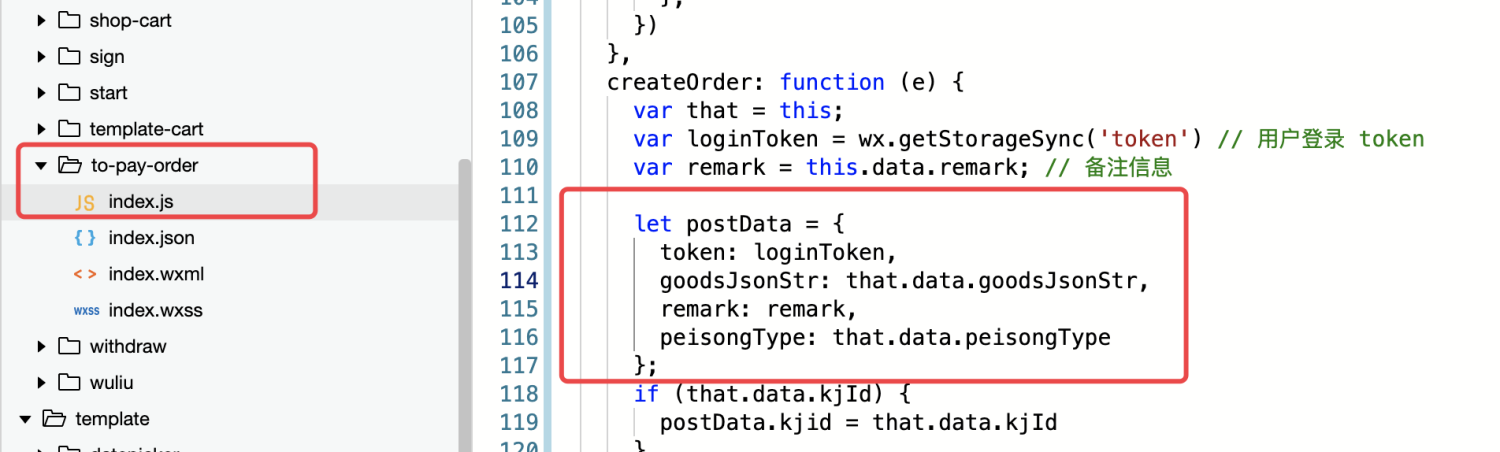
In the order creation interface, you need to specify the **autoDeliver** parameter as true, then the order will be considered an order that supports automatic delivery:
```javascript
const postData = {
token: wx.getStorageSync('token'),
autoDeliver: true,
goodsJsonStr: JSON.stringify(goodsJsonArray)
}
```
For example, if you use the "Angel Children's Clothing" template, please add autoDeliver: true, in the following place.
#Automatic shipping sequence
According to the FIFO (first in, first out) principle, the card code/coupon uploaded first will be automatically issued first.