To use the apifm interface in a mini program, you need to go to the background of your mini program ([https://mp.weixin.qq.com/](https://mp.weixin.qq.com/)), left menu, "Development" --> "Development Settings" --> "Server Domain Name
**"Settings" add the interface domain name of the apifm, otherwise the data cannot be obtained;**
****
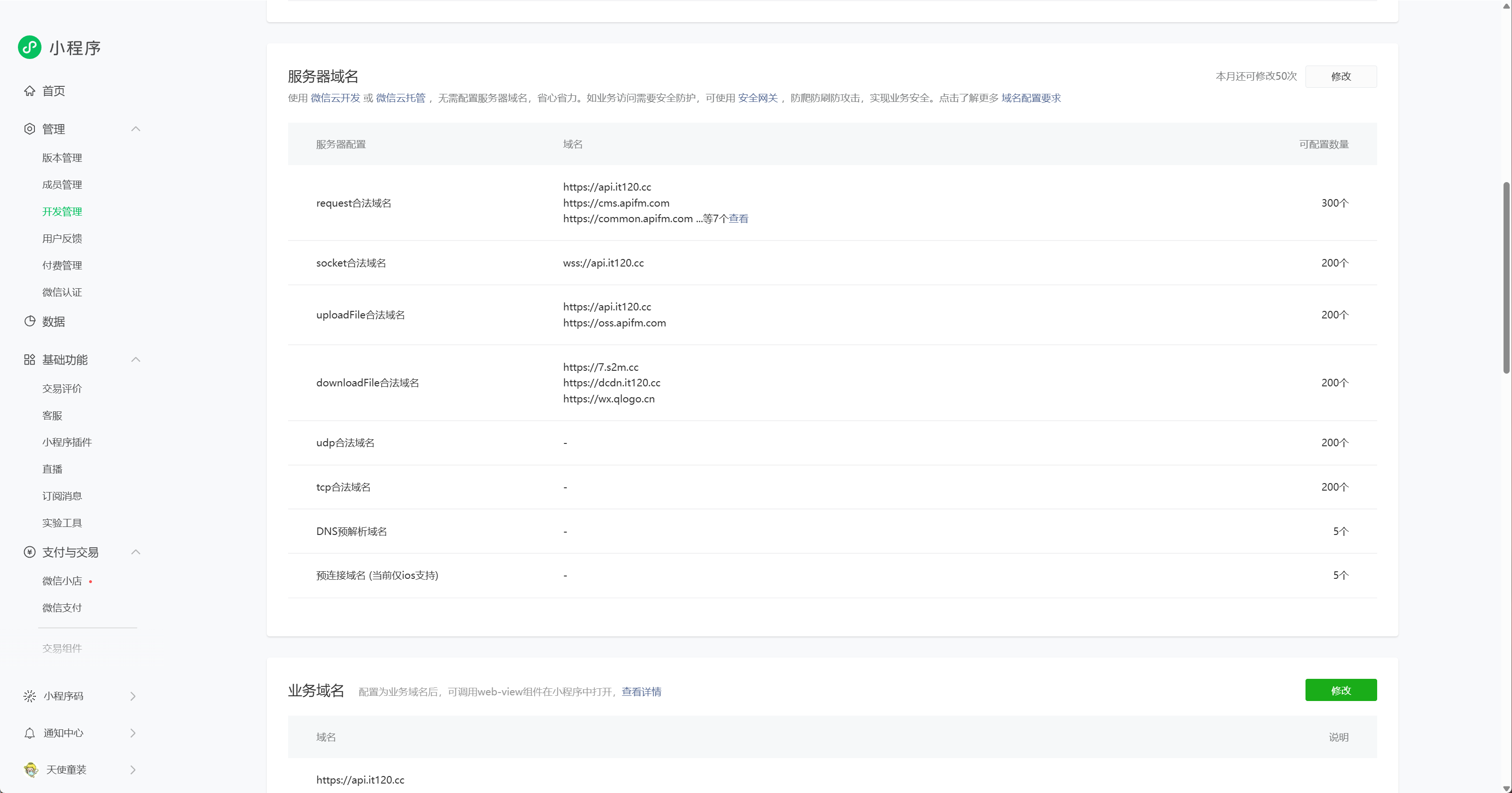
**There are 3 types of domain names that can be set [leave blank for other domain names]: **
**Please copy and paste the domain name below exactly as it is. No modification is required, just copy and paste it as it is!**
> request: Mini program calling interface
>
https://api.it120.cc
https://cms.apifm.com
https://common.apifm.com
https://oss.apifm.com
> upload: upload file address
>
https://oss.apifm.com
https://dfs.apifm.com
> downloadFile: download file address
>
https://dcdn.it120.cc
https://wx.qlogo.cn
https://thirdwx.qlogo.cn
You can add multiple domain names here, not just one. For example, for downloadFile in the picture above, we added 3 domain names;
After adding, check whether the addition is successful on the development tools (click this refresh button for settings):

**After the domain name here is modified, you need to restart your development tools to take effect!**
**If it is a mobile preview, please kill the WeChat/mini program process first and then reopen the mini program!**