# Preface
This tutorial is based on the "apifm-wxapi" module and teaches you how to quickly implement small program development, so you may need to understand the following knowledge points first:
["Creating HelloWorld Project"](https://www.yuque.com/apifm/doc/hezlrm)
["Use "apifm-wxapi" to quickly develop small programs"](https://www.yuque.com/apifm/doc/mdldsd)
# Function description
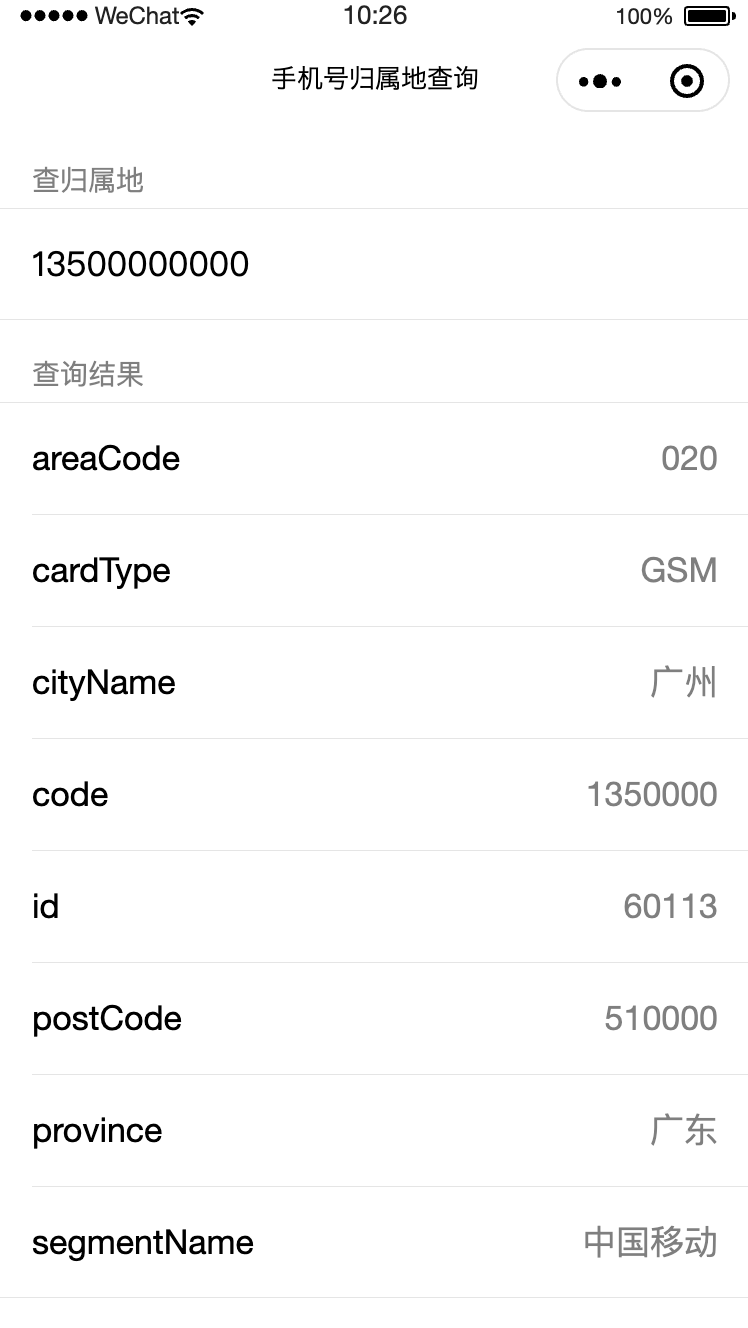
Enter any mobile phone number to check the location of the mobile phone number
# Mini program implementation
## Effect demonstration

## wxml code
```plainCheck the place of originQuery results{{ key }}{{ item }}```
## js code
```plain
const WXAPI = require('apifm-wxapi')
Page({
data: {
mobile: undefined,
queryResult: undefined,
},
onLoad: function (options) {
},
onShow: function () {
},
mobileChange(e){
this.setData({
mobile: e.detail.value,
queryResult: null
})
},
query() { // query
if (!this.data.mobile){
wx.showToast({
title: 'Mobile phone number cannot be empty',
icon: 'none'
})
return
}
WXAPI.queryMobileLocation(this.data.mobile).then(res => {
console.log(res)
if (res.code == 0) {
wx.showToast({
title: 'Query successful',
icon: 'success'
})
this.setData({
queryResult: res.data
})
} else {
wx.showToast({
title: res.msg,
icon: 'none'
})
}
})
}
})
```
_More usage methods about apifm-wxapi: _
["apifm-wxapi Instructions for Use"](https://github.com/gooking/apifm-wxapi/blob/master/instructions.md)
_Download the Demo code of this case: _
["apifm-wxapi using Demo program"](https://github.com/gooking/apifm-wxapi-demo)
Looking forward to your progress!
grateful!