"apifm" usually uses a mobile phone number to log in as a super administrator. After logging in, you can see a lot of "apifm" information, as well as the entire "Factory settings" menu;
Through this menu, you can set the modules enabled in your background (determine which menu functions appear on the left), activate plug-ins and other functions.
However, in actual use, we hope to create multiple administrators to collaboratively manage the backend. Each administrator can only operate certain specified functions, realizing the separation of permissions and roles, assigning responsibilities to each person, and improving overall management efficiency.
This tutorial helps you learn to use the administrator functions:
# Enable the "role/admin" module
Click the left menu "Factory settings" --> "Module management", find the "Role/Administrator" module, click Enable, then F5 to refresh the web page, you will see the left menu "Administrator/Permissions"
# Function introduction
This module is mainly divided into two functions: role management and administrator management
**Role Management**
You can create any role (such as financial controller, editor, warehouse manager, etc.), and when creating, check the menus and functions allowed for the role;
After that, this permission can only operate the functions you checked, and you can only see the menu of the checked part. The menu without permission will be hidden;
**Admin**
Create an administrator account here. After creation, you will be able to log in to the backend through the administrator's account and password;
When creating an administrator, you need to assign roles to the administrator. You can check multiple roles for an administrator at the same time;
The functions and menus that the administrator can operate will be the sum of the permissions of all the roles you have checked;
**If set as a super administrator, the selected role function will be invalid, and the super administrator will have all operating functions! **
****
**Open store administrator**
Store administrators can only manage products and orders in their own store(Do not set as super administrator!)# Where to log in
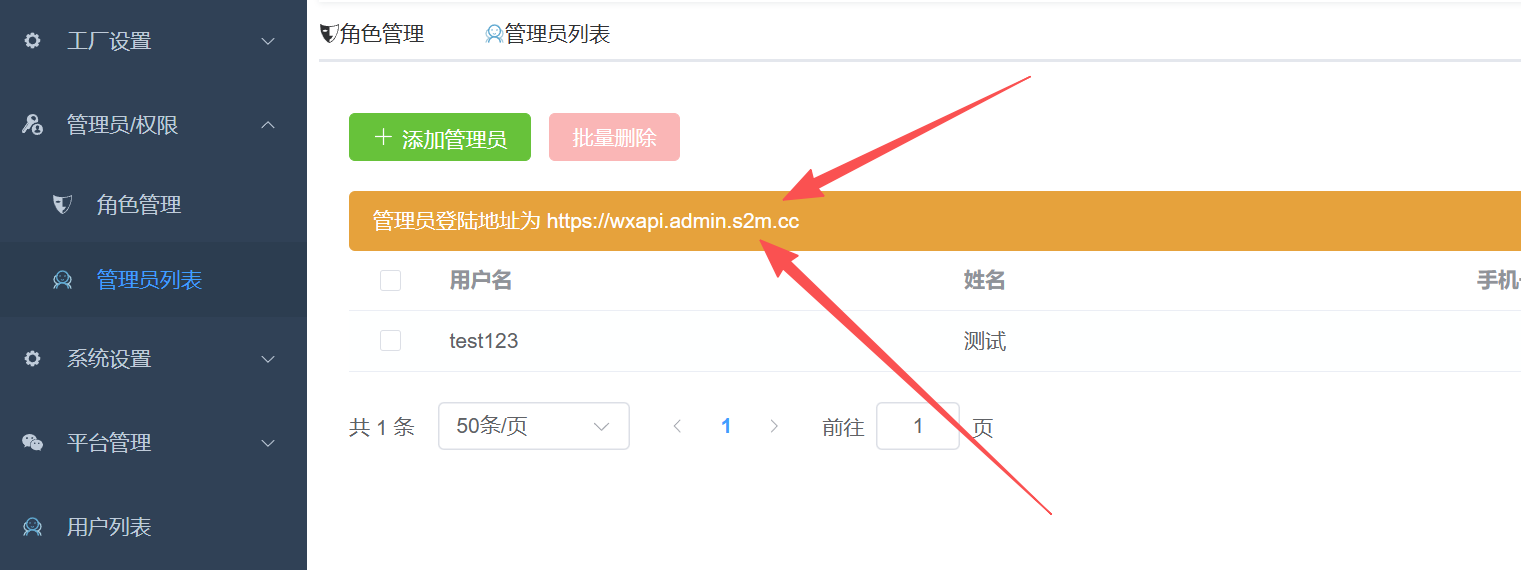
**You have clearly set up the correct administrator account information, but when you log in, it prompts that the account and password are incorrect. It is probably because you did not log in from your own exclusive backend login address!**
Each user has his own unique backend login address: