[https://developers.weixin.qq.com/miniprogram/dev/framework/open-ability/channels-live.html](https://developers.weixin.qq.com/miniprogram/dev/framework/open-ability/channels-live.html)
# Video account live broadcast
If the mini program and the video account have the same or related entities, you can jump to the video account's live broadcast room or initiate a video account live broadcast reservation in the mini program.
## Subject judgment
### Subject information query
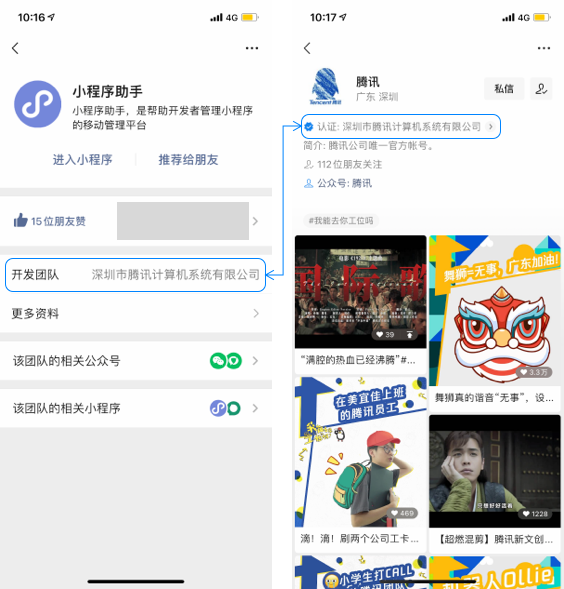
The mini program subject information can be queried through the mini program information page - development team, and the video account subject information can be queried through the video account homepage - authentication.
The video ID must be passed[Video Account Assistant](https://channels.weixin.qq.com/login)Get.

### subject judgment logic
If the main body of the mini program and the video number are the same, the relevant interface can be called. If the main body of the mini program and the video account are different, the relevant interfaces can be called if the following three conditions are met at the same time:
1. The mini program is bound[WeChat Open Platform](https://open.weixin.qq.com/)Account number
2. The relationship between the mini program and the WeChat open platform account is the same subject or[Associated Subject](https://kf.qq.com/faq/190726rqmE7j190726BbeIFR.html)
3.The subject of the WeChat open platform account and the associated subject list include the subject of the video number. For the associated subject application process, please refer to: https://kf.qq.com/faq/190726e6JFja190726qMJBn6.html
## How to use
### Mini program jumps to video account live broadcast room
from base library [2.15.0](https://developers.weixin.qq.com/miniprogram/dev/framework/compatibility.html) Start supporting
1. Developers first pass[wx.getChannelsLiveInfo](https://developers.weixin.qq.com/miniprogram/dev/api/open-api/channels/wx.getChannelsLiveInfo.html)The incoming video account ID is used to obtain the live broadcast information of the video account, including the live broadcast ID (two parameters: feedId and nonceId) and the live broadcast status. The meaning of live broadcast status is as follows:
+ status=2: The live broadcast is in progress. The feedId and nonceId returned at this time are the current live broadcast ID.
+ status=3: The live broadcast has ended. The feedId and nonceId returned at this time are the latest live broadcast ID.
1. After obtaining the live broadcast information, developers can[wx.openChannelsLive](https://developers.weixin.qq.com/miniprogram/dev/api/open-api/channels/wx.openChannelsLive.html)Open the live video account. If there is no live broadcast currently, it will jump to the end page of the latest live broadcast. The usage restrictions of this interface are as follows:
+ The user needs to trigger a jump. If the user does not click anywhere on the mini program page, the developer will not be able to call this interface.
+ The user is required to confirm the jump. Before jumping to the live broadcast of the video account, a pop-up window will be added to ask whether to jump. The user can only jump to the live broadcast of the video account after confirming.
### Initiate a live video appointment within the mini program
from base library [2.19.0](https://developers.weixin.qq.com/miniprogram/dev/framework/compatibility.html) Start supporting
1. Developers first pass[wx.getChannelsLiveNoticeInfo](https://developers.weixin.qq.com/miniprogram/dev/api/open-api/channels/wx.getChannelsLiveNoticeInfo.html)The incoming video account id is used to obtain the video account's live broadcast notice id (noticeId). If there is currently no live broadcast notice available for reservation, failure will be returned.
2. After obtaining the live broadcast preview information, developers can[wx.reserveChannelsLive](https://developers.weixin.qq.com/miniprogram/dev/api/open-api/channels/wx.reserveChannelsLive.html)Call up the reservation pop-up window, and the user can make reservations. The successful evocation of the pop-up window means that the interface call is successful. The user's specific operation behavior can be obtained through state:
+ state = 1, the live broadcast is in progress, the user clicks "Cancel" to refuse to go to the live broadcast.
+ state = 2, the live broadcast is in progress, the user clicks "Allow" to go to the live broadcast
+ state = 3, the preview has been canceled
+ state = 4, the live broadcast has ended
+ state = 5, the user has not made a reservation before, and will close the pop-up window without making a reservation for the live broadcast in the pop-up window.
+ state = 6, the user has not made a reservation before, but made a reservation for the live broadcast in the pop-up window.
+ state = 7, the user has made a reservation before and canceled the reservation in the pop-up window.
+ state = 8, the user has made a reservation before, and can directly close the pop-up window
+ state = 9, the user cancels the pop-up window directly before it is called up.
+ state = 10, the live broadcast reservation has expired
## Instructions for use
1. wx.getChannelsLiveInfo and wx.getChannelsLiveNoticeInfo will call WeChat backend system resources. In order to protect the system, developers please comply with["Interface Call Frequency Specification"](https://developers.weixin.qq.com/miniprogram/dev/framework/performance/api-frequency.html)Set appropriate frequency limits on interfaces and avoid unrestrained calls.
2. The platform will resolutely crack down on behaviors such as inducing jumps to live broadcasts from video accounts, inducing live broadcasts from scheduled video accounts, etc. Please strictly abide by this when using this function.["WeChat Mini Program Platform Operation Specifications"](https://developers.weixin.qq.com/miniprogram/product/)。
## Things to note
1. This interface can be called in both the development version and the trial version. During the debugging process, developers can select the visible range of the video number to start broadcasting to facilitate testing.
2. If the mini program is inconsistent with the main information of the video account, error code 100008 will be returned.
3. The wx.getChannelsLiveInfo and wx.getChannelsLiveNoticeInfo callback functions do not inherit user click events, and wx.openChannelsLive cannot be called in the success callback of wx.getChannelsLiveInfo.
4. Developer tools do not yet support this capability, please use a real device for debugging first.