# Preface
This tutorial is based on the "apifm-wxapi" module and teaches you how to quickly implement small program development, so you may need to understand the following knowledge points first:
["Creating HelloWorld Project"](https://www.yuque.com/apifm/doc/hezlrm)
["Use "apifm-wxapi" to quickly develop small programs"](https://www.yuque.com/apifm/doc/mdldsd)
["Register for free to open the backend and obtain an exclusive domain name"](https://www.yuque.com/apifm/doc/qr6l4m)
# Function description
Coupon information is released in the background, and a fixed amount, amount range (random amount), and collection password can be set;
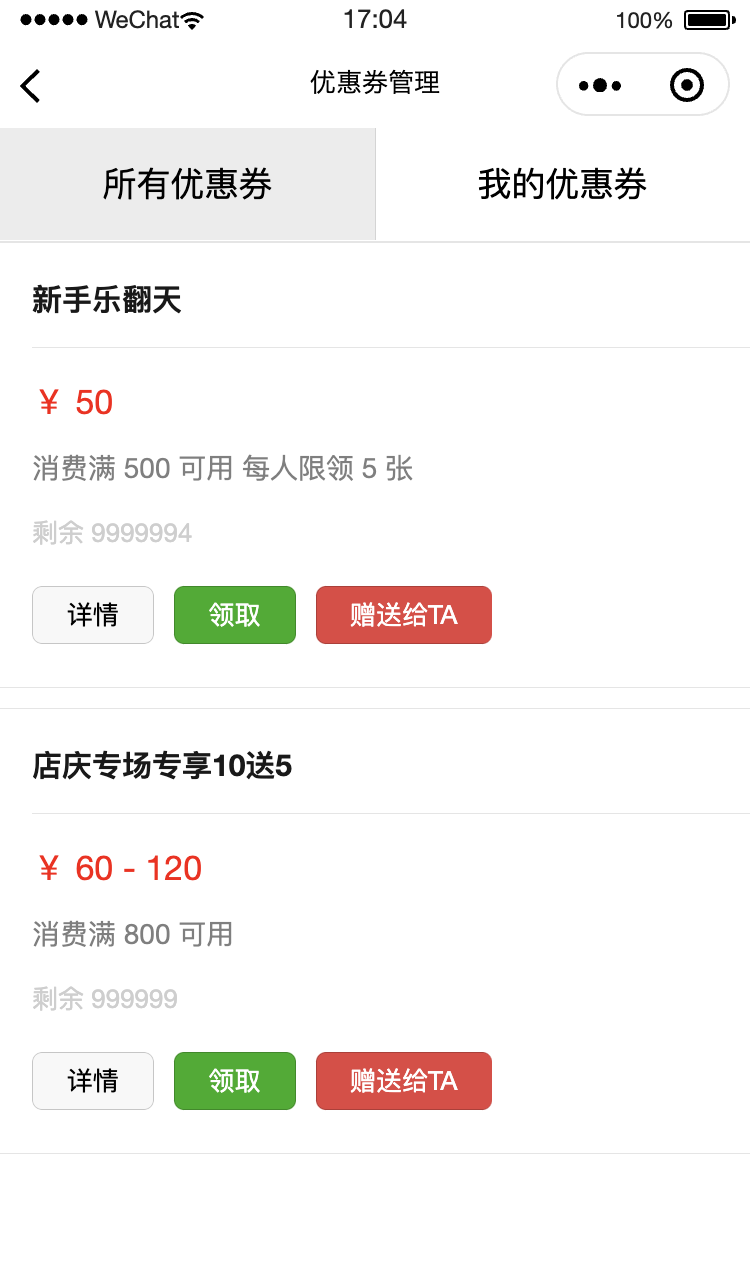
The mini program displays all available coupon information;
After logging in, users can receive coupons, which can be used when placing orders in the subsequent order module;
I need to be able to manage my coupons (you can give your coupons to others);
# Enable the "coupon" module
Log in to the "First Step" registration background, left menu --> Factory settings --> Module management
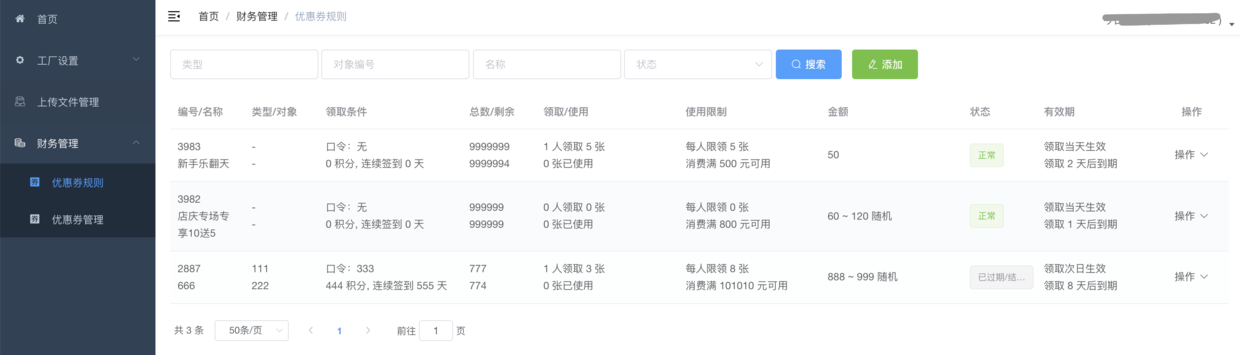
Find the "Coupon" module, click "Enable Module", then F5 to refresh the background interface, you will see the new menu:
"Financial Management" --> "Coupon Rules" + "Coupon Management" 2 menus;
#Backend management
## Add coupon rules
Add coupon rules and create coupon rules based on your own actual situation. After the user receives the coupon, the coupon will be issued to the user according to the set rules;
## Coupon Management
After the user receives the coupon, it will be managed in this menu, and the administrator can manually invalidate the user's coupon;
# Mini program implementation
## Effect demonstration
## wxml code
```plain{{item}} {{ item.name }} ¥ {{ item.moneyMin }}¥ {{ item.moneyMin }} - {{ item.moneyMax }}Available after spending {{ item.moneyHreshold }}Each person is limited to {{ item.numberPersonMax }} piecesPassword requiredRequires {{ item.needScore }} pointsSign in continuously for {{ item.needSignedContinuous }} daysRemaining {{ item.numberLeft }}Please check the console to read the data. You can do the page rendering yourself, refer to TAB1```
## js code
```plain
const WXAPI = require('apifm-wxapi')
const sliderWidth = 96; // Need to set the width of the slider to calculate the middle position
Page({
/**
* Initial data of the page
*/
data: {
tabs: ["All Coupons", "My Coupons"],
activeIndex: 0,
sliderOffset: 0,
sliderLeft: 0,
couponList: undefined
},
onLoad: function (options) {
const _this = this;
wx.getSystemInfo({
success: function (res) {
_this.setData({
sliderLeft: (res.windowWidth / _this.data.tabs.length - sliderWidth) / 2,
sliderOffset: res.windowWidth / _this.data.tabs.length * _this.data.activeIndex
});
}
});
this.coupons()
},
onShow: function () {
},
goRegist() {
wx.navigateTo({
url: '/pages/auth/index'
})
},
tabClick: function (e) {
this.setData({
sliderOffset: e.currentTarget.offsetLeft,
activeIndex: e.currentTarget.id
});
if (e.currentTarget.id == 0) {
this.coupons()
} else {
this.myCoupons()
}
},
coupons(){
WXAPI.coupons().then(res => {
console.log(res)
if (res.code == 0) {
this.setData({
couponList: res.data
})
} else {
wx.showToast({
title: res.msg,
icon: 'none'
})
this.setData({
couponList: null
})
}
})
},
myCoupons(){
const loginToken = wx.getStorageSync('loginToken')
if (!loginToken) {
wx.showToast({
title: 'Please log in first',
icon: 'none'
})
this.goRegist()
return
}
WXAPI.myCoupons({
token: loginToken.token
}).then(res => {
console.log(res)
if (res.code == 0) {
this.setData({
couponList: res.data
})
} else {
wx.showToast({
title: res.msg,
icon: 'none'
})
this.setData({
couponList: null
})
}
})
},
couponDetail(e){
const id = e.currentTarget.dataset.id
WXAPI.couponDetail(id).then(res => {
console.log('Coupon details data:', res)
wx.showModal({
title: 'Tips',
content: 'Read successfully, check the console',
showCancel: false
})
})
},
fetchCoupons(e){
const loginToken = wx.getStorageSync('loginToken')
if (!loginToken) {
wx.showToast({
title: 'Please log in first',
icon: 'none'
})
this.goRegist()
return
}
const id = e.currentTarget.dataset.id
WXAPI.fetchCoupons({
id: id,
token: loginToken.token
}).then(res => {
console.log(res)
if (res.code == 0) {
wx.showToast({
title: 'Received successfully',
icon: 'success'
})
} else {
wx.showToast({
title: res.msg,
icon: 'none'
})
}
})
},
sendCoupons(e){
console.log('This method is left to you as a job to implement')
// WXAPI.sendCoupons({ })
}
})
```
> WXAPI.init('gooking') This code links your mini program to your backend, where gooking is your exclusive domain name (please check the chapter about exclusive domain names in the preface);
>
# Summary
This case mainly uses the following three methods of apifm-wxapi:
```plain
WXAPI.coupons(Object object)
WXAPI.couponDetail(id)
WXAPI.fetchCoupons(Object object)
WXAPI.myCoupons(Object object)
WXAPI.sendCoupons(Object object)
```
**For more detailed parameter usage and more advanced advanced usage methods, please refer to the API interface documentation: **
["api interface document"](#)
_More usage methods about apifm-wxapi: _
["apifm-wxapi Instructions for Use"](https://github.com/gooking/apifm-wxapi/blob/master/instructions.md)
_Download the Demo code of this case: _
["apifm-wxapi using Demo program"](https://github.com/gooking/apifm-wxapi-demo)
Looking forward to your progress!
grateful!