We assume that there are two "apifm" accounts, A and B. In order to facilitate testing and quickly deploy new ones, we hope to have a quick method to publish initialization data in the background. Then, the data cloning function is designed to meet this business need.
#warning
The data cloning function introduced in this article. During the data cloning process, the background data will be cleared and then filled with data. Therefore, be sure to confirm 2 things:
1. Make sure that the data in the account can be cleared and deleted. If there is data that cannot be deleted, please do not use the data cloning function!
2. Data deleted during the data cloning process cannot be recovered!It is irrecoverable!It is irrecoverable! Be sure to proceed with caution! ! !
3. During the cloning process, the direction of cloning must not be reversed, for example, A->B. As a result, during the actual operation, never change it to B->A! ! !# Clone method
## Method 1: Take the initiative to clone data to others
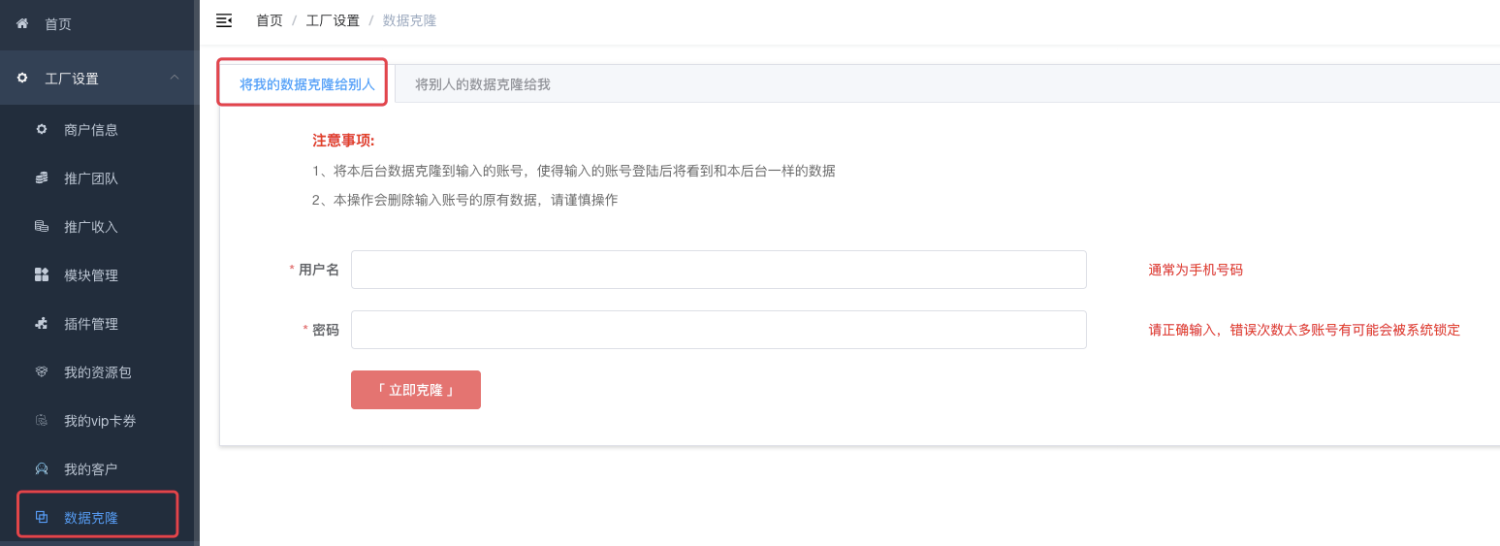
Clone the data of the background you are currently logged in to the "apifm" account you fill in below. The data of the account with user name + password filled in here will beEmpty! Empty! Empty! Unable to recover!Unable to recover!Unable to recover!After the cloning is completed, the user name + password you enter below, this account will have the same data as the backend you are currently logged in to.
This method of cloning data requires an account that is currently logged in to the backend and must be a paid member (Professional version/Value-added version).
## Method 2: Clone the other party’s data to me

In this case, the data of the account you are currently logged in will beEmpty! Empty! Empty! Unable to recover!Unable to recover!Unable to recover!After the cloning is completed, your account will have the same data as the other party's.
To use this method to clone data, two conditions need to be met at the same time:
1. If you know the other party’s merchant ID, please consult the other party;
2. The other party has enabled the function of allowing data to be cloned by others. By default, cloning is not allowed;
How to enable data to be cloned? ["Click here and scroll to the bottom"](https://www.yuque.com/apifm/doc/kcncad)