# Enable plugin
1. If you are a free member, it is a pity that you cannot use the plug-in function of apifm for the time being;
2. If you are a professional version member, log in to the backend, go to "Factory settings" --> "Plugin management" on the left menu, find the "Electronic Form" plug-in, and purchase it online to activate it;
3. If you are a value-added member, you don’t need to do anything, you can use all plug-in functions for free;
# Activate module
"Factory settings" --> "Module management", search for "electronic form" and enable this module

# Apply for a courier company billing account
Contact the express company and apply for opening an electronic bill (monthly settlement) account, which will be used to automatically generate electronic express bills.
# Configure Mini Program Logistics Assistant

Configure the electronic bill account information you applied for at the express company, and then click to synchronize to the mini program

## SF Express needs to be added manually in the mini program background
Login [https://mp.weixin.qq.com/](https://mp.weixin.qq.com/)


# Set sender information
Electronic bill account setting interface, fill in the sender's information
#Set click-to-jump applet linkAfter the electronic order is shipped, WeChat will send a delivery notification to the user. The user can click the notification on WeChat to jump back to your mini program, so here you need to fill in the address of the order details of your mini program.`{id}`It is a fixed value, copy and fill it in directly, and the system will automatically replace it with the order ID. The example address below is the order details address of the open source "Angel Children's Clothing" template. If your order details address is not this, please fill it in according to the actual situation.Backstage left menu, System Settings -> System Parameters, add parameters:
Parameter type: text type
Parameter name: express_order_detail_page
Parameter content: pages/order-details/index?id={id}
Please fill in your own mini program URL address
# One-click shipping

At this point, you can select orders to be shipped in batches and achieve one-click delivery by clicking on the electronic form.
# Automatically/batch print receipts
## Add order player

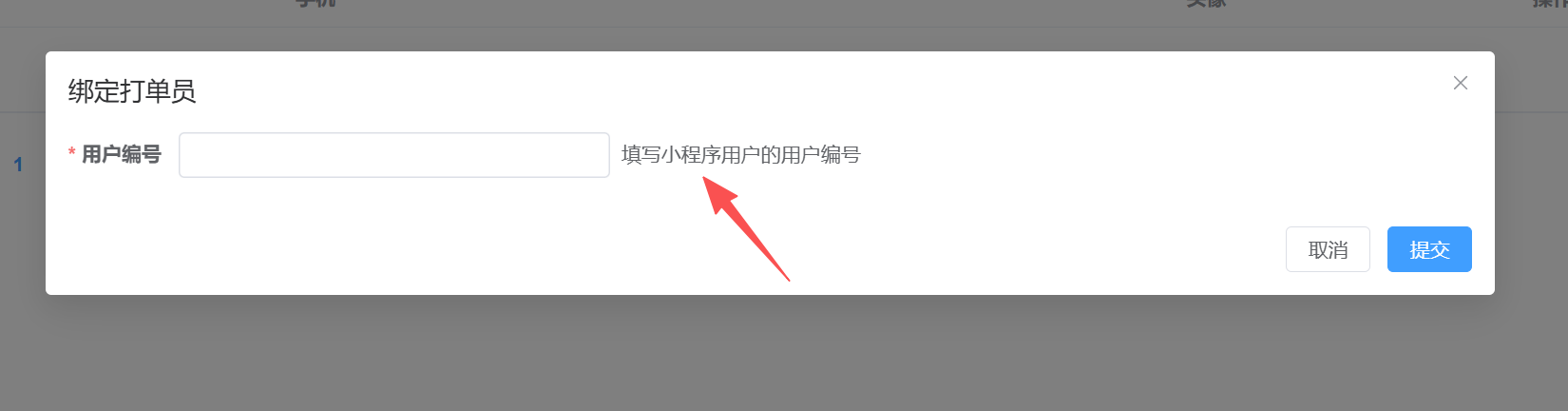
The user number here is the registered user of the mini program, which can be viewed and copied in the first column of the left menu, user management, user list;
Or in the mini program interface, go to the "My" interface in the bottom menu, click on the user ID at the top, and copy it directly;
**Never create a new user yourself, because the new user created does not have**`**opneid**`**of**
[https://developers.weixin.qq.com/miniprogram/dev/platform-capabilities/industry/express-download.html](https://developers.weixin.qq.com/miniprogram/dev/platform-capabilities/industry/express-download.html)
Download WeChat’s official ordering software here. After logging in, you can print electronic orders in batches or print orders fully automatically (new orders will be printed automatically after they are generated).
Finally, stick the printed receipt (self-adhesive) on the express package and wait for the courier to pick it up.