# Preface
This tutorial is based on the "apifm-wxapi" module and teaches you how to quickly implement small program development, so you may need to understand the following knowledge points first:
["Creating HelloWorld Project"](https://www.yuque.com/apifm/doc/hezlrm)
["Use "apifm-wxapi" to quickly develop small programs"](https://www.yuque.com/apifm/doc/mdldsd)
["Register for free to open the backend and obtain an exclusive domain name"](https://www.yuque.com/apifm/doc/qr6l4m)
# Requirements description
Users can leave messages/complaints/submit feedback on the mini program;
The background can view and manage all message data submitted by users;
# budget
0 yuan, free implementation
# Requirements realization
### Enable message module
Log in to the "First Step" registration background, left menu --> Factory settings --> Module management
Find the "Comment Management" module, click "Enable Module", then F5 to refresh the background interface, you will see the new menu: "CMS Module" --> "Message Management";
### Write small program code:
```plain
const WXAPI = require('apifm-wxapi')
WXAPI.init('gooking')
Page({
data: {
},
onLoad: function (options) {
WXAPI.addComment({
type: 0,
content: 'This is the content of the message, which can be seen in the background after submission'
}).then(res => {
console.log(res)
})
}
})
```
> WXAPI.init('gooking') This code links your mini program to your backend, where gooking is your exclusive domain name (please check the chapter about exclusive domain names in the preface);
>
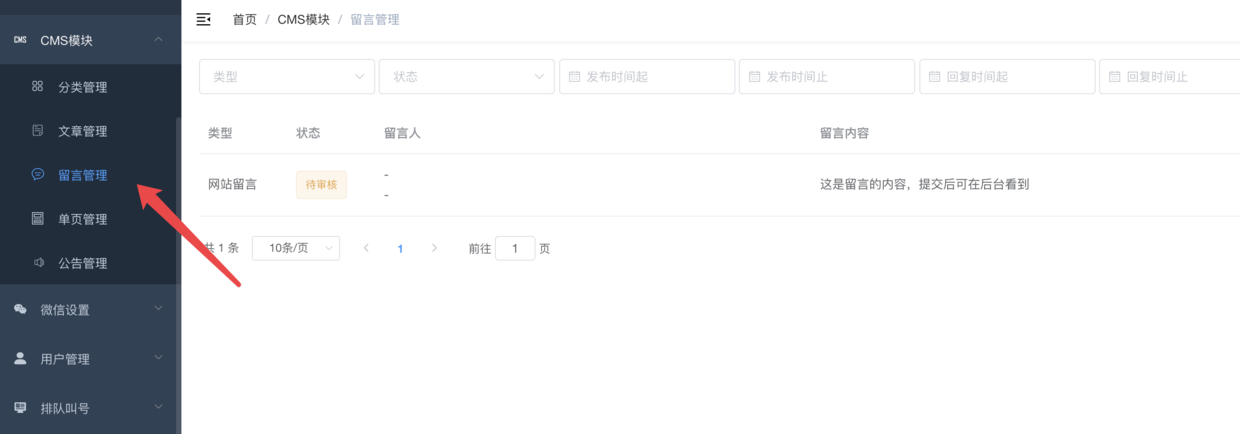
### Run the mini program and log in to the background to view the user's messages
Attached screenshots are as follows:
# Master advanced
> WXAPI.addComment
>
What are the main parameters?
You can view the parameter description document of this interface to implement more advanced functions:
["api interface document"](#)
Through these parameters, you can leave messages, make complaints and suggestions, and comment on articles;
and "extJsonStr" support for form items that need to be filled in more
# Thinking questions
You can try to use the following method to read the data of user comments and then display it on the mini program interface;
This method generally reads all comment data of the article in combination with the article details:
```plain
WXAPI.commentList(Object object)
```
Looking forward to your progress!
grateful!