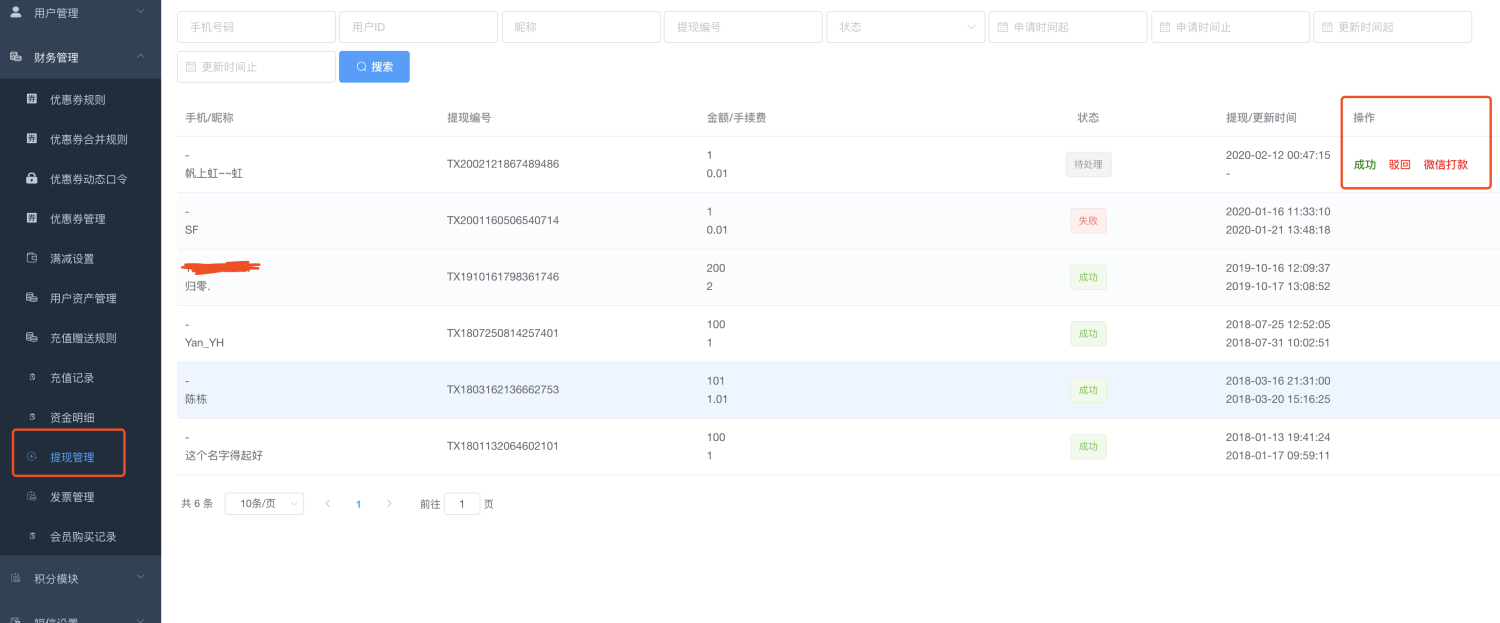
# Method one:
You pay money to the user yourself by communicating with the user, including but not limited to: cash, WeChat transfer, Alipay transfer, bank card transfer
After the real money is paid to the user, click the "Success" button to set the withdrawal record applied by the user as a successful withdrawal;
The withdrawal amount frozen when the user applies for a balance in the mini program will be deducted by the system;
#Method 2:
Click the "WeChat Payment" button, which will do the two things in "Method 1" at the same time:
1. Use the ["Merchant Transfer to Change"] (https://www.yuque.com/apifm/doc/nxodtt) interface to pay through your WeChat payment, and the real money will be automatically transferred to the user's WeChat;
2. The user’s withdrawal application record is set to withdrawal success, and the frozen withdrawal amount in the user’s mini program balance is deducted simultaneously;
**The function of merchants transferring money to users is transferred from your WeChat Pay "operating account" to the user, not your "basic account"! !**
**The function of merchants transferring money to users is transferred from your WeChat Pay "operating account" to the user, not your "basic account"! !**
**The function of merchants transferring money to users is transferred from your WeChat Pay "operating account" to the user, not your "basic account"! !**
**The money paid to you by the user goes into the basic account. You need to recharge the money for operating the account yourself! !**
#Rejection process
Click Reject. The status of the current withdrawal record is withdrawal failure. At the same time, the balance that was originally frozen when the user applied for withdrawal will be released and returned to his available balance.