# Preface
The prerequisite for the use of three-level distribution is the establishment of relationships between users. The system must first clarify which user invited (developed) a user, and establish a relationship network between users in the system, so that rebates can be made based on the relationship after subsequent sales are completed.
The so-called three-level distribution means that the rebate level is up to 3 levels. Of course, the first-level distribution is achieved by setting the second and third-level rebates to 0; the third-level rebate is set to 0 to achieve 2-level distribution.
How are user relationships established? Please review the following chapters:
["How to establish an invitation relationship between users/invitation registration mechanism"](https://www.yuque.com/apifm/doc/lc73ys)
# Enable plugin
1. If you are a free member, it is a pity that you cannot use the plug-in function of apifm for the time being;
2. If you are a professional version member, log in to the backend, go to "Factory settings" --> "Plugin management" on the left menu, find the "Third-Level Distribution" plug-in, and purchase it online to activate it;
3. If you are a value-added member, you don’t need to do anything, you can use all plug-in functions for free;
# enable module
Left menu "Factory settings" --> "Module management", find the "Three-level distribution" module, enable the module and refresh the page, you will be able to see the three-level distribution related menus in the left menu
# Distribution settings

The third-level distribution supports cash/point rebates. You can set up cash rebates or points rebates according to your actual needs.
The settings shown above:
1. Level 1 rebate: sales_50%_28%
2. Second level rebate: sales_50%_13%
3. Level 3 rebate: sales_50%_9%
The settings here are global settings. In the picture above, 50% of the sales of all products is set for rebate distribution. However, in actual applications, there will be a need to set separate proportions for different products;
For example, products with high profits can be set to give 60% as commission rebates; products with low profits can only give 30% as commission rebates;
In response to this demand, you can design this ratio individually for the product when managing the product and publishing/editing the product;
**If the product has a proportion set, the product settings shall prevail; if the product has not set a proportion, the global setting proportion here shall prevail**
# Instructions about distributors
Only distributors can get rebates. If you are an ordinary user and are not a distributor, although you can establish a normal user relationship, you will not get rebates, which will also affect the rebates of your superior distributors.
**In the left menu "User Management", you can view and set the distributor identity of a user**
# How to become a distributor
If a user wants to become a distributor, there are several ways:
## Manual adjustment by administrator
The administrator edits a user in "User Management" and directly sets it as a distributor or cancels a user's distributor status;
## After the user applies, the administrator will review it.
The user applies to become a distributor in the mini program/webpage/app, and after the administrator reviews and approves it in the background, the user becomes a distributor;
## Users automatically become distributors after registration
By setting the following system parameters, newly registered users can automatically obtain distributor status.
The switch parameter REGISTER_OPEN_SELLER is set to on.
## Invite a specified number of users to automatically upgrade
In the distribution settings, you can set up to automatically obtain distributor status after inviting n users.
## Complete the task and upgrade yourself
In the system parameters, add text parameters:upgrade_fxs_conditionThe configuration is as follows Json:
```javascript
{
fans: 100,
fansLevel1: 10,
orderNumber90Days: 100
}
```
+ fans number of invitees (number of fans)
+ fansLevel1 Number of direct invitations (number of direct fans)
+ orderNumber90Days Number of settled orders in the last 90 days
In the above example, as long as you have 100 fans, 10 direct fans, and the number of recommended transactions in the last 90 days reaches 100, you can self-service upgrade to become a distributor without going through administrator review.
Upgrade method:
By calling the interface:/{domain}/saleDistribution/upgrade Complete the upgrade yourself## Pay directly to upgrade to become a distributor
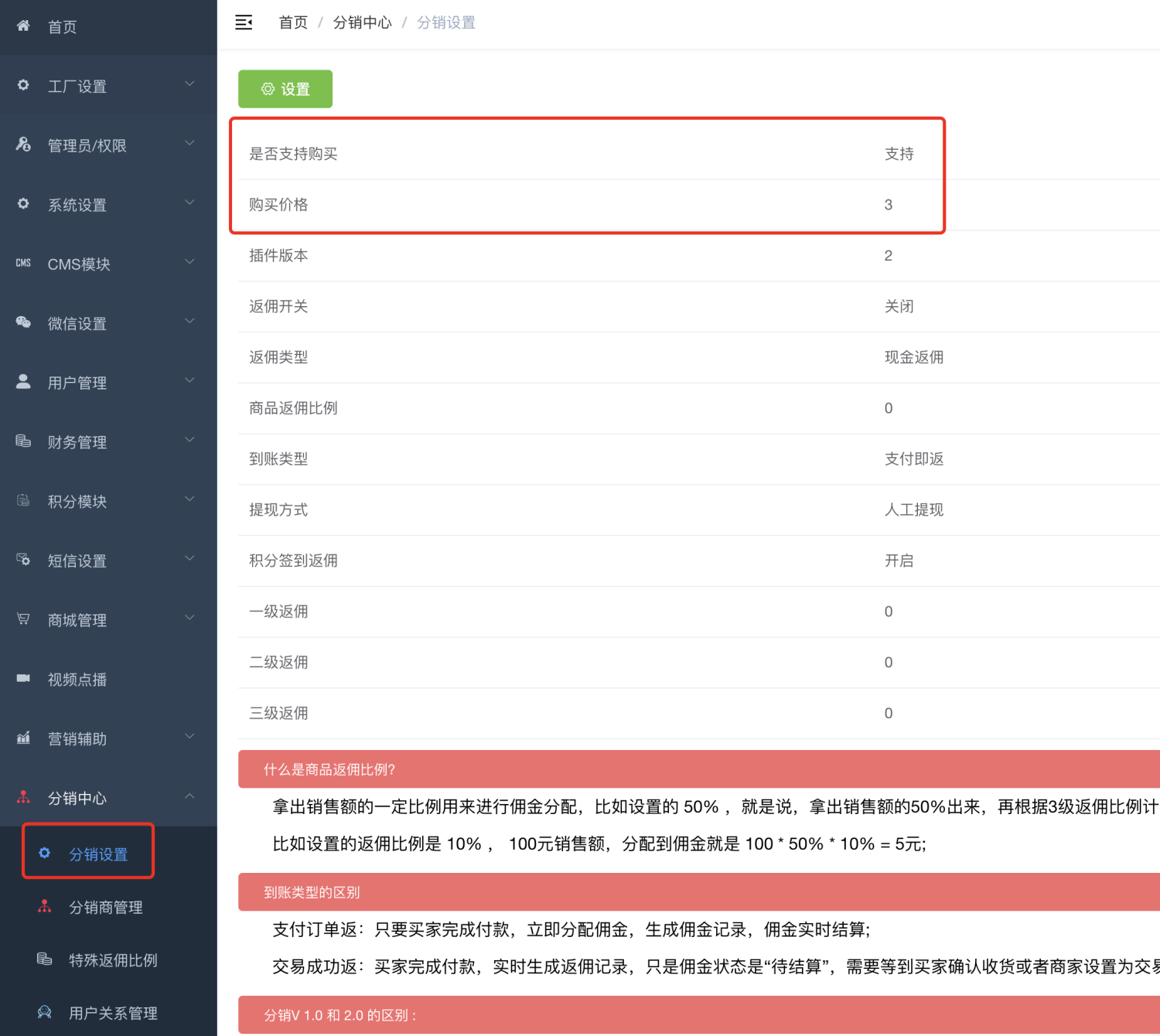
Paid upgrades are enabled in the background, and users can directly purchase and activate distributors through the interface.
## Purchase designated distribution products to obtain distributor status

# Related interfaces
For specific interfaces and interface descriptions, please refer to the interface documentation. To facilitate your understanding, here is a brief summary:
## Read background distribution settings
Read the distribution setting information configured in the background in the picture above. Through this interface, you can read whether paid upgrades are supported and the amount paid.
```plain
GET /{domain}/saleDistribution/setting
```
## Apply to become a distributor
Users can apply to become a distributor by themselves
```plain
POST /{domain}/saleDistribution/apply/v2
```
## Check application progress
After users apply to become a distributor by themselves, they can check the review progress through this interface.
```plain
GET /{domain}/saleDistribution/apply/progress/v2
```
## Complete the task and upgrade yourself to a distributor
```plain
POST /{domain}/saleDistribution/upgrade
```
## Pay to upgrade to a distributor
```plain
POST /{domain}/saleDistribution/buy
```
## View my team
```plain
POST /{domain}/saleDistribution/members
```
## View commission details
```plain
POST /{domain}/saleDistribution/commision/log
```
## View order details
View rebate order details
```plain
GET /{domain}/saleDistribution/order-info
```
## Get commission statistics to be settled
```plain
GET /{domain}/saleDistribution/commission/freeze
```
The interface returns:
+money Commission to be settled
+ mjtCommission to be rebate mjt
+ mjtOrder to be given mjt## Cumulative sales ranking of distributors
```plain
GET /{domain}/saleDistribution/sale-room-rank/total
```
## Distributor team sales rankings
```plain
GET /{domain}/saleDistribution/sale-room-rank/team/total
```
## Query the sales ranking of a certain day
```plain
GET /{domain}/saleDistribution/sale-room-rank/daily
```
## Query your N-day cumulative business summary
```plain
GET /{domain}/saleDistribution/statistics/days
```
The interface returns:
+number The total number of orders
+ commissionAmount Commission accumulated amount
+ saleroom cumulative sales## Team member statistics
```plain
GET /{domain}/saleDistribution/members/statistics
```
The interface returns:
+totleFans Total number of fans
+ totleChildFxs Total number of distributors
+ totleChildFxsLevel1 Number of all direct distributors
+ totleChildFxsLevel2 Number of total indirect distributors
# FAQ
## No commission record or commission rebate generated?
Please follow the steps below to troubleshoot:
1. Check whether the “third-level distribution plug-in” is valid?
_Go to “Factory settings” --> “Plugin management” and check whether the “Third-level distribution plug-in” is within the validity period; _
2. Check whether the distribution settings are correct
_Left menu --> Distribution management --> Distribution settings, check whether the rebate switch is on, and the consumption order status matches the "receipt type" setting; _
_ Calculate order amount _ Rebate ratio, the rebate amount after 2 decimal places is greater than 0; *
3. Calculation method of rebate amount
_Order amount _ Product rebate ratio * Commission ratio that can be obtained
The calculation result must be greater than 0, otherwise no commission will be returned*
4. Only distributors can enjoy rebates
*A invites B and B places an order. A does not get the rebate and does not see the rebate record.
Then, it is recommended that you immediately go to "User Management" to check whether A is a distributor. Only distributors can enjoy the rebate.
If A is not a distributor yet, please edit the user and set him or her as a distributor*
5. What should I do if the above problems have been checked but there is still no commission rebate?
*Next, I think we should check whether A is B’s online version:
Go to user management, enter A's user number in the search box "Inviter Number", click Search, and check whether B is in A's inviter list.
If there is no record, it means that B was not invited by A, then A will naturally not get the commission*
6. When is the user relationship established?
["How to establish an invitation relationship between users/invitation registration mechanism"](https://www.yuque.com/apifm/doc/lc73ys)
7. How to modify the user relationship later?
Left menu --> Distribution Management --> User Relationship Management
User relationships that you do not want to exist can be deleted and user relationships re-established.
Please note that user relationships are complex, and rebuilding user relationships requires a clear mind. It is not recommended for ordinary users to manually adjust relationships, which may lead to irreversible data errors!
```plain
For example, A develops B, B develops C, C develops D, D develops E
The user relationship is as follows:
A invitation B level 1 relationship;
A invitation C level 2 relationship;
A invitation D level 3 relationship;
B invitation C level 1 relationship;
B invitation D level 2 relationship;
B invitation E level 3 relationship;
C invitation D level 1 relationship;
C invitation E level 2 relationship;
D invitation E 1st level relationship;
```
_In other words, each user needs to establish 3 relationships, representing direct superiors, indirect superiors, and indirect superiors_
**If you don’t understand this concept very well, it is not recommended to adjust the user relationship! ! ! **
8. What is the maximum level of rebate?
Up to three levels!
```plain
D sells the product to E, then D first gets the first level rebate proportion; C gets the second level; B gets the third level;
Although B was developed by A, the commission cannot exceed level 3, so A has no commission.
```
## What if I only need Level 1/Level 2 distribution?
As long as you set the third-level rebate ratio to 0, it is equivalent to two-level distribution;
In the same way, as long as you set the rebate ratio of levels 2 and 3 to 0, it is equivalent to only level 1 distribution;