Integrate the one-click authorization (registration) login function of mobile QQ into your App to achieve quick registration and quick login functions
According to the instructions in this tutorial, it is expected that it will help you implement and master QQ login in 5 minutes.
# Apply to open QQ Internet
[https://connect.qq.com/](https://connect.qq.com/)
Go to the official website of QQ Internet and create a mobile application access. After passing the review, you can get an APP ID;
The APP ID mentioned below, or oauthConsumerKey, and oauth_consumer_key are all APP IDs worth mentioning here;
#Install Flutter dependencies
## pubspec.yaml file adds dependencies
```plain
dependencies:
flutter_qq: ^0.0.5
```
## Install dependencies
```bash
$ flutter pub get
```
##Introduce package
In the dart file, introduce the plug-in, which will be used below
```javascript
import 'package:flutter_qq/flutter_qq.dart';
```
# Configure Android / IOS packaging settings
## Android
Modify the AndroidManifest.xml file
**Add Permissions**
```xml
```
**Added under the application tag:**
```xml
```
**Add activity**
_Please replace [QQ APPId] below with the APP ID above_
```xml
```
## IOS
**Added in the project's Info.plist file:**
```xml
CFBundleURLTypes
CFBundleTypeRole
Editor
CFBundleURLName
tencent
CFBundleURLSchemes
tencent1107493622
LSApplicationQueriesSchemes
mqq
mqqapi
mqqwpa
mqqbrowser
mttbrowser
mqqOpensdkSSoLogin
mqqopensdkapiV2
mqqopensdkapiV3
mqqopensdkapiV4
wtloginmqq2
mqzone
mqzoneopensdk
mqzoneopensdkapi
mqzoneopensdkapi19
mqzoneopensdkapiV2
mqqapiwallet
mqqopensdkfriend
mqqopensdkdataline
mqqgamebindinggroup
mqqopensdkgrouptribeshare
tencentapi.qq.reqContent
tencentapi.qzone.reqContent
NSMicrophoneUsageDescription
microphoneUsageDescription
NSPhotoLibraryUsageDescription
photoLibraryDesciption
NSCameraUsageDescription
cameraUsageDesciption
LSRequiresIPhoneOS
UIBackgroundModes
fetch
remote-notification
```
**Added in the AppDelegate.m file of the project:**
```javascript
- (BOOL)application:(UIApplication *)application openURL:(NSURL *)url
options:(NSDictionary
*)options
{
NSString * urlStr = [url absoluteString];
[[NSNotificationCenter defaultCenter]
postNotificationName:@"QQ" object:nil userInfo:@{@"url":urlStr}];
return YES;
}
```
# Call mobile QQ
```javascript
loginQQ () async {
const appid = '1105644913';
await FlutterQq.registerQQ(appid);
var qqResult = await FlutterQq.login();
if (qqResult.code == 0) {
// Login successful
Fluttertoast.showToast(msg: 'Authorization successful', gravity: ToastGravity.CENTER, fontSize: 14);
var res = await Apifm.loginQQConnect(appid, qqResult.response['openid'], qqResult.response['accessToken']);
if (res['code'] == 10000) {
// If the user does not exist, register first
await Apifm.registerQQConnect({
'oauthConsumerKey': appid,
'openid': qqResult.response['openid'],
'accessToken': qqResult.response['accessToken'],
});
//Log in again after registration
res = await Apifm.loginQQConnect(appid, qqResult.response['openid'], qqResult.response['accessToken']);
}
if (res['code'] != 0) {
//Login failed
Fluttertoast.showToast(msg: res['msg'], gravity: ToastGravity.CENTER, fontSize: 14);
return;
}
processLoginSuccess (res['data']['token'], res['data']['uid']); // Business processing after successful login
} else if (qqResult.code == 1) {
//Authorization failed
Fluttertoast.showToast(msg: qqResult.message, gravity: ToastGravity.CENTER, fontSize: 14);
} else {
//User cancels authorization
Fluttertoast.showToast(msg: 'Cancelled', gravity: ToastGravity.CENTER, fontSize: 14);
}
}
```
# Method disassembly
## Initialize QQ interconnection components
```javascript
FlutterQq.registerQQ(APP ID);
```
## Pop up the QQ authorization window
```javascript
FlutterQq.login();
```
After the user clicks to agree to the authorization, you can get the authorization parameters: openid, accessToken
## QQ Internet one-click registration
```javascript
Apifm.registerQQConnect(Mapparams)
```
**QQ Internet’s one-click registration function requires the following parameters:**
_Parameters returned after QQ authorization: _
oauthConsumerKey, openid, accessToken
For details, please refer to the interface documentation of QQ Internet
_Optional parameters:_
referrer Inviter, the user ID that invited you to register
postJsonString registered extended information, Json data format
## QQ Internet one-click login
```javascript
Apifm.loginQQConnect(String oauthConsumerKey, String openid, String accessToken)
```
For the three parameters of login, please refer to the interface document of QQ Internet for return value description.
#User management
## Open the developer backend
["Using apifm plug-in for Flutter cloud development - Installation"] (https://www.yuque.com/apifm/doc/hggphs)
## User Management
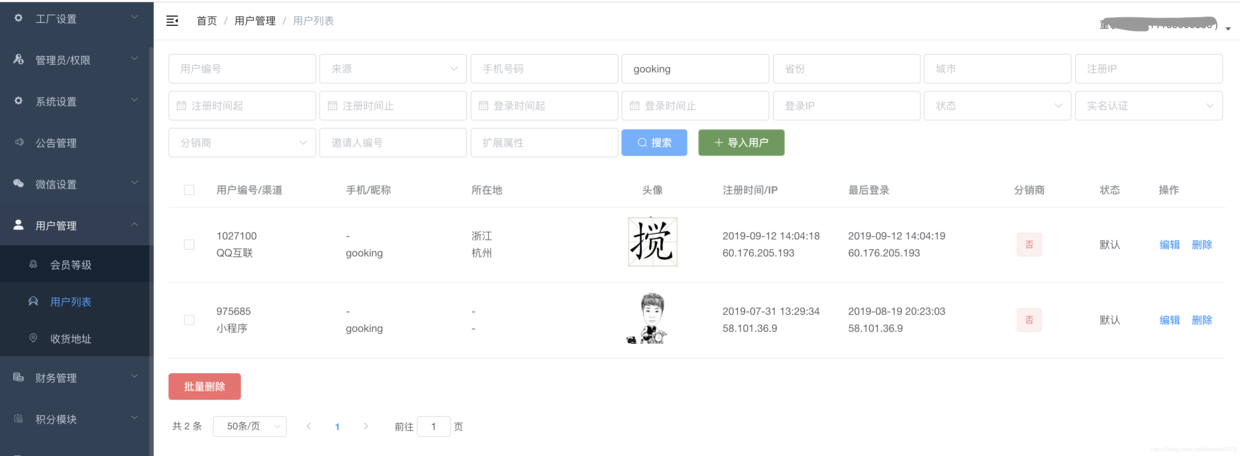
**Flutter source code for this example:**
[https://github.com/gooking/apifm-flutter-demo](https://github.com/gooking/apifm-flutter-demo)