# Introduction
"apifm" SDK is an encapsulation of the "apifm" Frontend API docs, so that everyone can more conveniently connect to the api interface of the "apifm" and realize rapid cloud development using the "apifm".
Based on the online Admin console provided by "apifm", there is no need to know back-end programming. Front-end personnel can easily develop various headlines/Douyin Mini Programs through simple JS method calls.
["api interface document"](#)
Of course, if you are not used to using JS-SDK, you can also directly call the api interface in the api interface document above.
# Version log
## version 4.1.0
[apifm-ttapi.js](https://www.yuque.com/attachments/yuque/0/2020/js/572726/1581835469214-87f3b35f-48e1-400d-b44d-fba43a22ec3a.js)「February 16, 2020」
```plain
Added mini program payment method: ttpay(object)
Added method to query payment status: payQuery(token, outTradeId)
```
## version 4.0.0
[apifm-ttapi.js](https://www.yuque.com/attachments/yuque/0/2020/js/572726/1578106035618-b48215ad-7b3b-46ea-8801-ea2122617358.js)「January 4, 2020」
```plain
Generate small program code interface adjustment
```
## version 3.0.0
[apifm-ttapi.js](https://www.yuque.com/attachments/yuque/0/2020/js/572726/1578012182574-44ade145-b804-449f-b4ea-b10f64afb19f.js) 「January 3, 2020」
```plain
Simplified file upload interface, now no need to pass token parameter
```
## version 2.0.0
[apifm-ttapi.js](https://www.yuque.com/attachments/yuque/0/2020/js/572726/1577852695501-ea04259b-cb39-4983-9271-23341d08a0ca.js) 「January 01, 2020」
```plain
Supports "apifm" full set of backend and interface functions
```
#Instructions for use
## Download the latest version of JS-SDK
Download the latest js file above and save it to any directory in your mini program folder
## Mini program legal domain name configuration
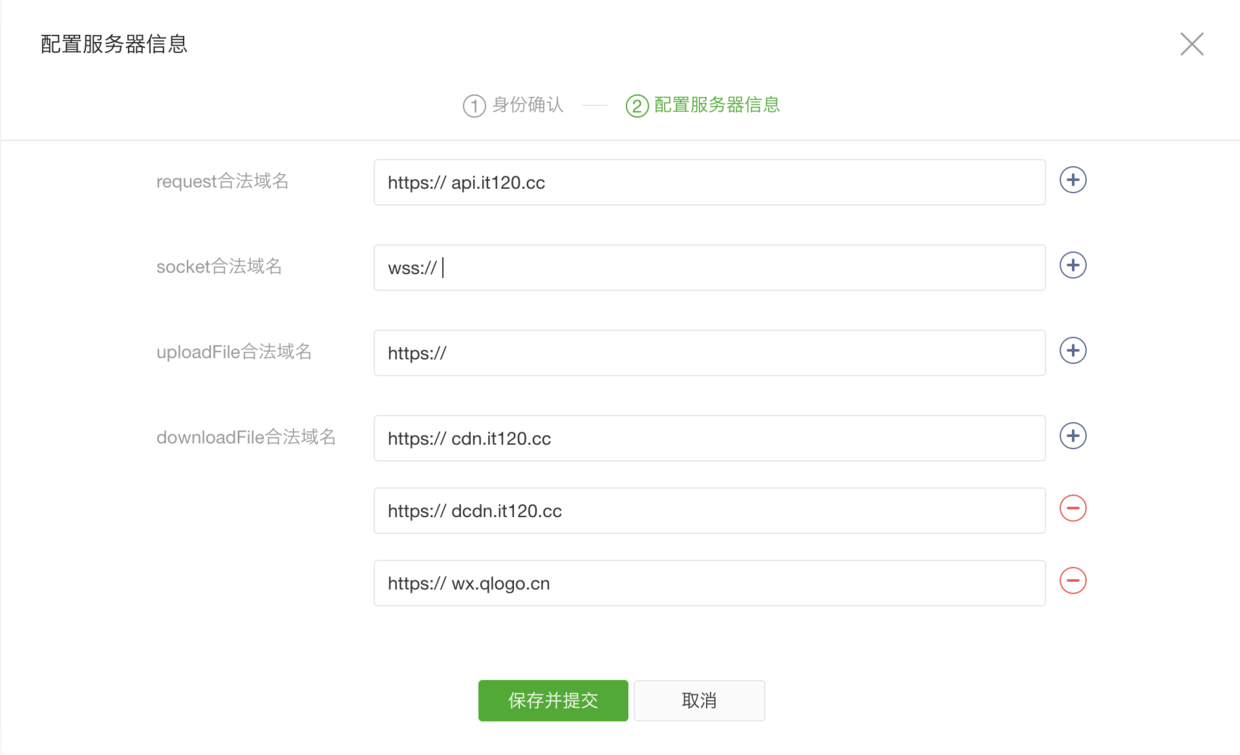
The 4 domain names are:
1. api.it120.cc
2. cdn.it120.cc
3. dcdn.it120.cc
4. wx.qlogo.cn
## Connect to the background
Free registration to open backend
[https://admin.it120.cc/](https://admin.it120.cc/)
Open the apifm-ttapi.js file downloaded above and modify the subDomain in the third line of code to complete the connection with your own backend.
How to check the exclusive domain name of your own backend, please see the tutorial:
[https://www.it120.cc/help/qr6l4m.html](https://www.it120.cc/help/qr6l4m.html)
## Call background data
At this point, you can already call any method in JS-SDK:
### Introduce JS-SDK
```javascript
const TTAPI = require('../utils/apifm-ttapi.js')
```
### Call JS method
For example, the mini program reads the product Banner carousel image you added in the background:
```javascript
TTAPI.banners().then(res => {
console.log(res) // res is the data returned by the Banner interface, and then you can display it in the mini program.
})
```
or
```javascript
const res = await TTAPI.banners()
console.log(res) // res is the data returned by the Banner interface, and then you can display it in the mini program.
```