# Syntax
The template is parsed by the freemarker engine, so it natively supports all freemarker syntax. You can Baidu to learn about the simple use of freemarker syntax, including how to judge, how to loop, how to format and process data, etc.
# tag support
## Receipt printer
The printer uses tags (similar to html format) to format the output content. The specific instructions are as follows:
```plain
: newline character
: Cutter command (automatically cuts paper, only effective when using a cutter printer): Print LOGO command (provided that the LOGO image is built into the machine in advance): Cash drawer or external audio command: Center to enlarge: Magnification doubled: Centered: The font size is doubled: Double the font width: QR code (for a single order, only one QR code can be printed at most): right aligned: Font bold
Note: When placing an order, the new order voice will be played by default. If you use the voice of "Apply for refund" or "Apply for cancellation of order", please use the following commands.: Voice command to apply for a chargeback. The content of the broadcast is: A user has applied for a chargeback.: Apply for voice command to cancel the order. The content of the broadcast is: A user has applied to cancel an order.
Barcode labels only support printing of content specified by the following labels123ABCDEF: A barcode that is a mixture of numbers and uppercase letters. It supports up to 14 digits of mixed barcodes of numbers and uppercase letters.123ABCDef: A barcode that is a mixture of numbers and uppercase and lowercase letters. It supports up to 14 digits of mixed barcodes of numbers, uppercase letters, and lowercase letters.0123456789: Supports up to 22 digits of pure numbers
```
### Reference template A
```plain${order.id} number
${.now?datetime}
Name Quantity Amount
--------------------------------
<#list goods as test>
${test.goodsName} ${test.property!""} ${test.number} ${test.amount}
--------------------------------
Total: ${order.amountReal} yuan
Order number: ${order.orderNumber}
Contact number: 0571-28180512
https://www.it120.cc/```
### Reference template B
```jsonMini program order
${order.id}
${.now?datetime}<#list goods as test>
${test.goodsName} ${test.property!""}
Quantity: ${test.number} Amount: ${test.amount}
--------------------------------Coupon discount: ${order.amountCoupons}
Remarks: ${order.remark!"None"}
--------------------------------
Name: ${extJson["name"]}
Phone: ${extJson["Mobile phone number"]}
Meal period: ${extJson["Meal period"]}
Meal date: ${extJson["pickup time"]}
--------------------------------
<#if order.isNeedLogistics>
Contact: ${logistics.linkMan}
Contact number: ${logistics.mobile}
Shipping address: ${logistics.address}
<#if order.isCanHx>
${order.hxNumber}
Pick-up point: ${extJson["Pick-up point"]}
<#else>
${order.pickPointPwd}
Pick-up cabinet: ${extJson["pick-up point"]}
Pickup code: ${order.pickPointPwd}
Total: ${order.amountReal} yuan
Order number: ${order.orderNumber}
```
### Reference template C
```javascript
<#if order.isNeedLogistics>Takeaway order<#else>Store order
${order.qudanhao}${order.orderNumber}
Wuhan International Plaza Store
027-xxxxxxxxxxxx"The Pioneer of New Tea Drinks"In 2012, in the era when creamer, milk powder, and fruit powder were popular, we created the first cup of cheese tea in an alley along the riverside in Jiangmen. We used real milk, fresh fruits, real tea, sugar and other natural raw materials, creating what is known as the "new era of vegetable drinks." At the same time, we also hope to be a window of inspiration and promote new tea drinks into the design world that goes beyond tea.Scan the QR code to check the progress of meal pickup
https://wxaurl.cn/80kzL5wVumm--------------------------------
${stringMaxWidth("Product Name", 20)}${stringMaxWidth("Quantity", 6)}${stringMaxWidth("Amount", 6)}
--------------------------------
<#list goods as test>
${stringMaxWidth(test.goodsName, 20)}${stringMaxWidth(test.number, 6)}${stringMaxWidth(test.amount, 6)}--------------------------------
${stringMaxWidth("Total", 26)}${stringMaxWidth(order.amount, 6)}
--------------------------------${stringMaxWidth("Amount payable", 26)}${stringMaxWidth(order.amountReal, 6)}
<#if order.isNeedLogistics>
"Shipping address"Contact: ${logistics.linkMan}
Phone: ${logistics.mobile}
Address: ${logistics.address}
"Real quality and not expensive"Serve daily good tea"Happy, inspiration has come."Be happy as a person
```
## Label machine
```plainn:
Set the direction of paper output and printed fonts during printing, n 0 or 1. Each time the device is restarted, it will be initialized to 0 value setting, 1: forward paper output, 0: reverse paper output,
Such as1
QR code content:
Print the QR code, where attribute x is the coordinate of the starting point in the horizontal direction (default is 0), attribute y is the coordinate of the starting point in the vertical direction (default is 0), and attribute e is the error correction level:
L 7%M 15%Q 25%H 30% (default is K), attribute w is the QR code width (default is 5)text content:
Print text, where attribute x is the coordinate of the starting point in the horizontal direction (default is 0), attribute y is the coordinate of the starting point in the vertical direction (default is 0), and attribute font is the font:
1. 8×12 dot alphanumeric font
2. 12×20 dot alphanumeric font
3. 16×24 dot alphanumeric font
4. 24×32 dot alphanumeric font
5. 32×48 dot alphanumeric font
6. 14×19 dot alphanumeric font OCR-B
7. 21×27 dot alphanumeric font OCR-B
8. 14×25 dot alphanumeric font OCR-A
9. 9×17 dot alphanumeric font
10. 12×24 dot alphanumeric font
11. Traditional Chinese 24×24Font (Big 5)
12. Simplified Chinese 24×24Font (GB code)
13. Korean 24×24Font (KS code)
The default is 12 Simplified Chinese 24×24Font (GB code), the attribute w is the text width magnification factor 1-10 (default is 1), the attribute h is the text height magnification factor 1-10
The attribute r is the text rotation angle (clockwise):
0 0 degrees
90 90 degrees
180 180 degrees
270 270 degrees
(default is 0)12345678: Print code128 one-dimensional code, where attribute x is horizontal
The coordinates of the starting point in the direction (the default is 0), the attribute y is the coordinate of the starting point in the vertical direction (the default is 0), whether the attribute s is visible to the human eye: 0 is not visible, 1 is visible (the default is 1),
The attribute n is the width of the narrow bar, expressed in dots (default is 1), the attribute w is the width of the wide bar (the default is 1), expressed in dots, and the attribute r is the text rotation angle
(clockwise):
0 0 degrees
90 90 degrees
180 180 degrees
270 270 degrees
(default is 0)12345678: Print code39 one-dimensional code, where the attribute x is the horizontal direction
The coordinates of the starting point (default is 0), the attribute y is the coordinate of the starting point in the vertical direction (default is 0), whether the attribute s is visible to the human eye: 0 is not visible, 1 is visible (the default is 1), attribute
n is the narrow bar width, expressed in dots (default is 1), the attribute w is the wide bar width (default is 2), expressed in dots, and the attribute r is the text rotation angle (clockwise
direction):
0 0 degrees
90 90 degrees
180 180 degrees
270 270 degrees
(default is 0)
```
The unit of numbers in the above labels is dot. According to 1mm = 8dots, you can set it according to your own label size.
### Reference template
```plain1
#001 Table No. 5 1/3
Coke chicken wings
Mr. Zhang San 13800138000```
# Available variables
## Print time
```plain
${.now?string('yyyy-MM-dd HH:mm:ss')}
```
Time formatting parameter description:
1. yyyy is the 4-digit year
2. MM is a 2-digit month
3. dd is the date
4. HH is the number of hours in 24-hour format
5. mm is the number of minutes
6. ss is the number of seconds
For example, I want to display the time in Chinese form:
```javascript
${.now?string('yyyy year MM month dd day HH point mm minute ss second')}
```
_For details, please refer to the freemarker user manual_
## Order related variable reference
```json
${order.XXXXX}
```
The values in the _order_ object in the json data returned by the background order details interface can be called, for example:
_${order.qudanhao}_ will print out the order number;
_${order.orderNumber}_ will print out the order number;
_${order.amountReal}_ will print out the actual payment amount of the order;
```json
{
"type": 1, // 2 is a scan code order, 1 is a normal order
"type2": "extType passed when placing an order",
"amount": 500, // The amount of the product, excluding shipping costs
"amountLogistics": 0, // Shipping price
"amountReal": 500, // actual amount of order
"dateAdd": "2020-02-25 11:43:40", // order time
"goodsNumber": 1, // number of goods
"id": 464320, // Order ID
"qudanhao": "0006", // Order number
"orderNumber": "20022511439510006", // order number
"isNeedLogistics": true, // Whether express delivery is required
"peisongType": 0, // 0 merchant delivery plug-in; 1 Dada delivery; 2 Meituan delivery 3 flash delivery
"isPay": true, // Whether it has been paid
"pingtuanOpenId": false, // Group number
"isSuccessPingtuan": false, // Whether the group has been formed
"payNumber": "ZF2002251642338367", // Online payment order number
"payGate": "WXAPP", // Payment company number for online payment
"payOnlineAmount": 138.00, // Online payment amount
"remark": "No numbing or spicy", // Remarks
"tableCode": "A11", // table number
"pickPointId": "657340", // pick-up code
"shopId": 1234, // The ID of the store to which the order belongs
"shopName": "The name of the store where the order belongs",
"shopIdZt": 1234, // Order pick-up store ID
"shopNameZt": "Order pick-up store name",
"score": "How many points need to be deducted for the order",
"scoreDeduction": "The number of points participating in the point deduction amount for this order",
"isScoreOrder": "Whether to score the order",
"gotScore": "How many points can be obtained",
}
```
## Product details of the order
```plain
<#list goods as test>
... (You can call ${test.XXXX} here to display product data)```
The above code traverses and prints all order items. The values in the _goodsList_ object in the json data returned by the background order details interface can be called.
```json
{
"amount": 500, // total product price
"amountSingle": 500, // unit price
"goodsId": 1234, // Product ID
"goodsName": "WIFI 58mm thermal printer factory customized version", // Product name
"goodsSubName": "Subtitle", // Product subtitle
"number": 1, // Product quantity
"unit": "box", // Product unit
"property": "sku information", // Specification and size data of the product
"barCode": "1212343", // product barcode
"skuCode": "1212343", // sku specification number
"pic": "https://cdn.it120.cc/apifactory/2019/03/07/133eb6294e3853ebe4eb8551359a26dc.png", // Product picture
}
```
### Print the detailed specifications and dimensions of the product
```javascript
<#list goods as test>
<#list goodsProperty(test) as pro>
${pro.property.name} -> ${pro.child.name}
```
There may be multiple products in an order, so you need to loop through the goods
Each product may also contain multiple specifications and size information, such as (color: red, size: XL), so it also needs to be traversed
`goodsProperty(test)` is the list data of all specifications and sizes of this product obtained.
It contains 2 pieces of information:
+ property grouping information of specifications and sizes, such as color and size in the above example
- name name
- remark remarks
+ child corresponds to the attribute information under the specification group, such as red and XL in the above example
- name name
- remark remarks
`goodsAddition(test)` is the list data of optional accessories obtained for this product, including the following attributes
+ pid group id
+ id option id
+ pname group name
+ name option name
+ price price
+ remark remark information, please send it when placing an order
+ remark1 remark information, please send it when placing an order
+ remark2 remark information, please send it when placing an order
## Shipping address
```plain
${logistics.XXXXXX}
```
The values in the _apiExtOrderLogistics_ object in the json data returned by the background order details interface can be called
```json
{
"address": "Detailed address",
"areaStr": "Nan'an District",
"cityId": "500100000000",
"cityStr": "city district",
"code": "322000", // zip code
"districtId": "500108000000",
"linkMan": "Recipient Name",
"linkManMask": "Receive *** name",
"mobile": "mobile phone number",
"mobileMask": "135*****890",
"provinceId": "500000000000", // Province number
"provinceStr": "Chongqing City",
"shipperName": "Other express companies",
"trackingNumber": "Express tracking number",
"type": 0 // 0 Express, 1 Dada Delivery, 2 Meituan Delivery, 3 Kuairunner
}
```
## Store data
```plain
${shopInfo.XXXXXX}
```
If the current order belongs to a store, then you can call the above variable to directly print the store data;
All variables in the json data returned by the backend store details interface can be called
## Store area data
```plain
${shopArea.XXXXXX}
```
Information about the area where the store belongs:
+ name name
+ address address
## Order extended attributes
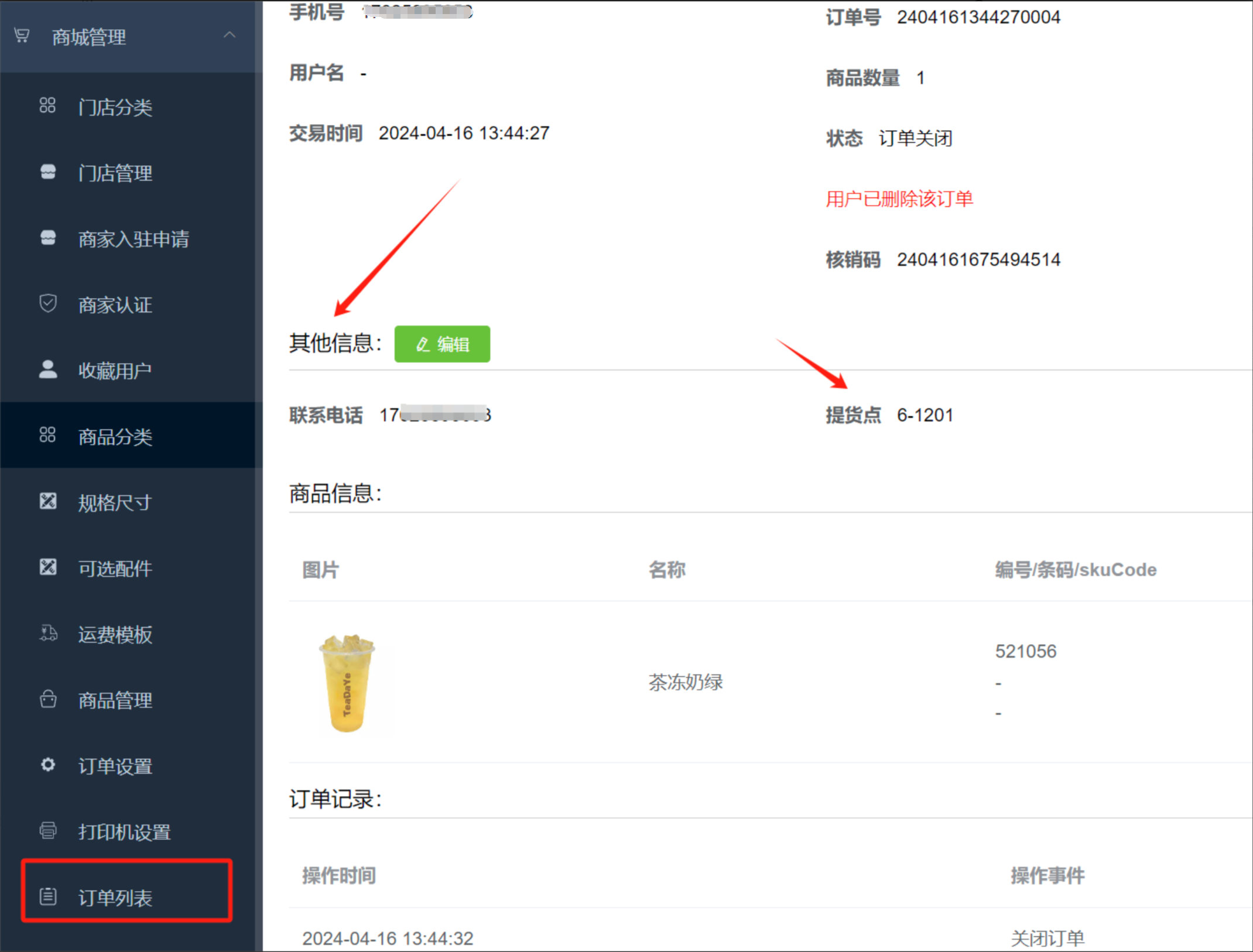
```javascript
${extJson.XXXXXX}
or
${extJson['XXXXXX']}
```
The values in the _extJson_ object in the json data returned by the background order details interface can be called
For example, to print the contact number in the picture above: `${extJson['Contact number']}`
For example, to print the pick-up point in the picture above: `${extJson['pick-up point']}`
## Print order user information
```json
${user.xxx}
```
Where xxx can be replaced by the following fields:
+ username username
+ email
+ mobile mobile phone
+ id user number
+ nick nickname
+ avatarUrl avatar image path
+ referrer inviter
+ gender gender
+ birthday birthday, date type, so ${user.birthday?string('yyyy-MM-dd')} needs to be formatted
+ levelId user level ID
## User asset status
```javascript
${userCash.xxx}
```
Where xxx can be replaced by the following fields:
+ balance available balance
+ freeze freeze balance
+ score remaining available points
+ totleConsumed cumulative consumption amount
+ growth growth value
+ totalWithdraw cumulative withdrawal amount
+ totalPayNumber The cumulative number of payments
+ totalScore the cumulative number of points earned
+ totalPayAmount cumulative payment amount
+ fxCommisionPaying Pending Distribution Commission
## Label machine product split printing variables
```xml
${goodsIndex}
```
What kind of product is currently being printed (starting from 0)
```xml
${goodsNumberIndex}
```
The number of a certain product currently printed (the maximum is the total number purchased by the user)
```xml
${gIdx}
```
If the user places an order for 3 products, 2 of each product, then if the quantities are printed separately, this variable will print 1-6 in sequence; if the quantities are combined and printed, this variable will print 1-3 in sequence; if the quantities are printed in summary, this variable will be fixed at 1
```plain
${curGoods.XXXXXX}
```
```json
{
"amount": 500, // total product price
"amountSingle": 500, // unit price
"goodsName": "WIFI 58mm thermal printer factory customized version", // Product name
"number": 1, // Product quantity
"pic": "https://cdn.it120.cc/apifactory/2019/03/07/133eb6294e3853ebe4eb8551359a26dc.png", // Product picture
}
```
## Print the product details in the package
```plain
${goodsPackageContent(1514858, '2023-08-24')}
```
+ The first parameter is the product ID
+ The second parameter is the date, print the side dishes in the set meal on this date
## Coupon details of the order
```plain
<#if coupons??>
<#list coupons as test>
... (Here you can call ${test.XXXX} to display coupon data)
```
+ type coupon type
+ name Coupon name
+ money coupon amount
+ moneyType 0 fixed amount 1 ratio
+ remark note
+ source coupon source
## Print pickup point information
```javascript
<#if pickPoint??>
${pickPoint.name}```
+ id number
+ name name
+ type type
+ address address
+ linkMan Contact
+ tel contact number
+ numberOrder The current number of orders held at the pick-up point
+ numberOrderMax can accommodate the maximum number of orders
+ status 0 normal; 1 disabled
# Fixed number of displayed text
## Use stringMaxWidth
```javascript
${stringMaxWidth(original string, number of characters)}
```
For example:
```javascript
${stringMaxWidth("aaaaaaaaaaaaaa", 5)} // Output 5 a's
${stringMaxWidth("a", 5)} // Output 1 a and 4 spaces
```
## Freemarker native implementation
For example, in a label machine, the text will not wrap automatically, so the text length needs to be variable to automatically wrap the line. Then, it needs to be able to intercept the displayed word length for control:
For example, the following code is originally used to print the specification information of the product. However, if the specification is too long and the label machine will not automatically wrap lines, the remaining text content will not be printed:
```html${curGoods.property}```
If only 10 words can be printed on a line (just an example), then the above statement can be changed to:
```bash
<#if curGoods.property?? && curGoods.property?length gt 10>${curGoods.property?substring(0,10)}
${curGoods.property?substring(10)}
<#else>
${curGoods.property}
```