# Preface
This tutorial is based on the "apifm-wxapi" module and teaches you how to quickly implement small program development, so you may need to understand the following knowledge points first:
["Creating HelloWorld Project"](https://www.yuque.com/apifm/doc/hezlrm)
["Use "apifm-wxapi" to quickly develop small programs"](https://www.yuque.com/apifm/doc/mdldsd)
["Register for free to open the backend and obtain an exclusive domain name"](https://www.yuque.com/apifm/doc/qr6l4m)
In this case, some functions require the user to log in before they can be operated, which means token authorization is required. Please understand first:
["WeChat Mini Program login to obtain openid and third-party tokens"](https://www.yuque.com/apifm/doc/kaygbw)
# Function introduction
Motivate users to log in to the mini program every day and complete daily check-in tasks to receive points rewards;
Points can be used to redeem points-exclusive coupons, points to offset shopping, and other scenarios;
The day after tomorrow, you can set the number of bonus points for signing in every day. If you sign in for x consecutive days, you can get y point rewards;
# enable module
Log in to the "First Step" registration background, left menu --> Factory settings --> Module management
Find and enable the following modules, then press F5 to refresh the background interface. You will be able to see all the function menus required for this case:
_The menu in this case is "Points Module" --> "Sign-in Rules"_
**Points Module**
# Set check-in rules
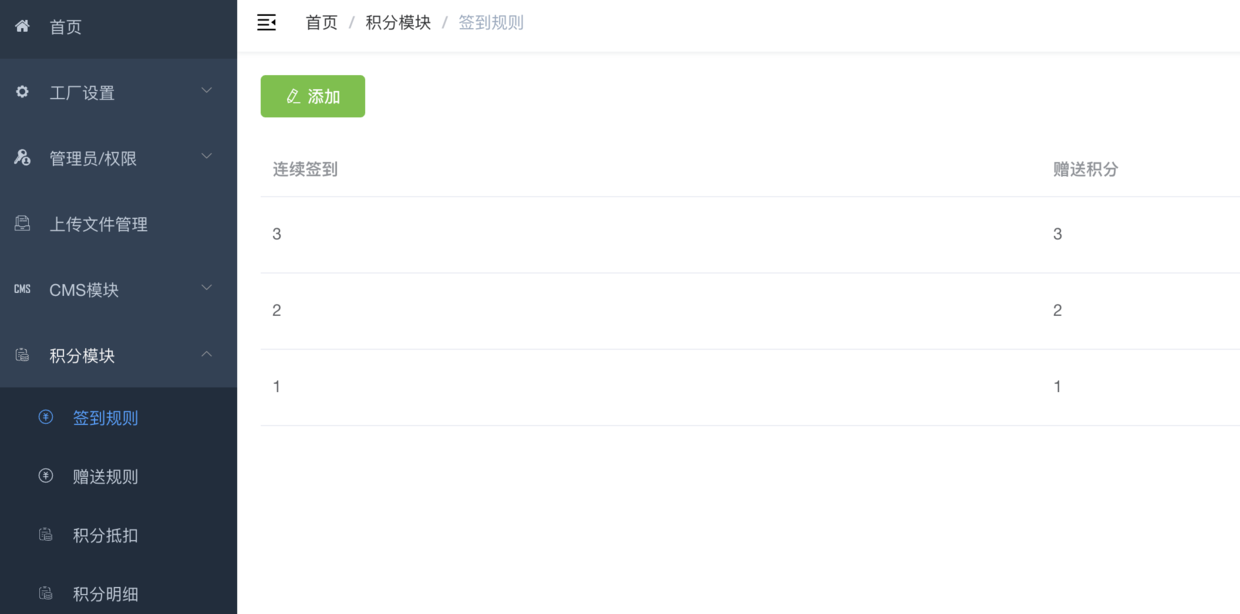
## Maximum number of consecutive check-in days
**Parameter type:** Text parameter
Parameter name: MAX_CONTINUOUS_SIGN_DAYS
The maximum number of consecutive check-in days. If the number exceeds this number, it will be treated as one consecutive check-in day.
#Write a small program
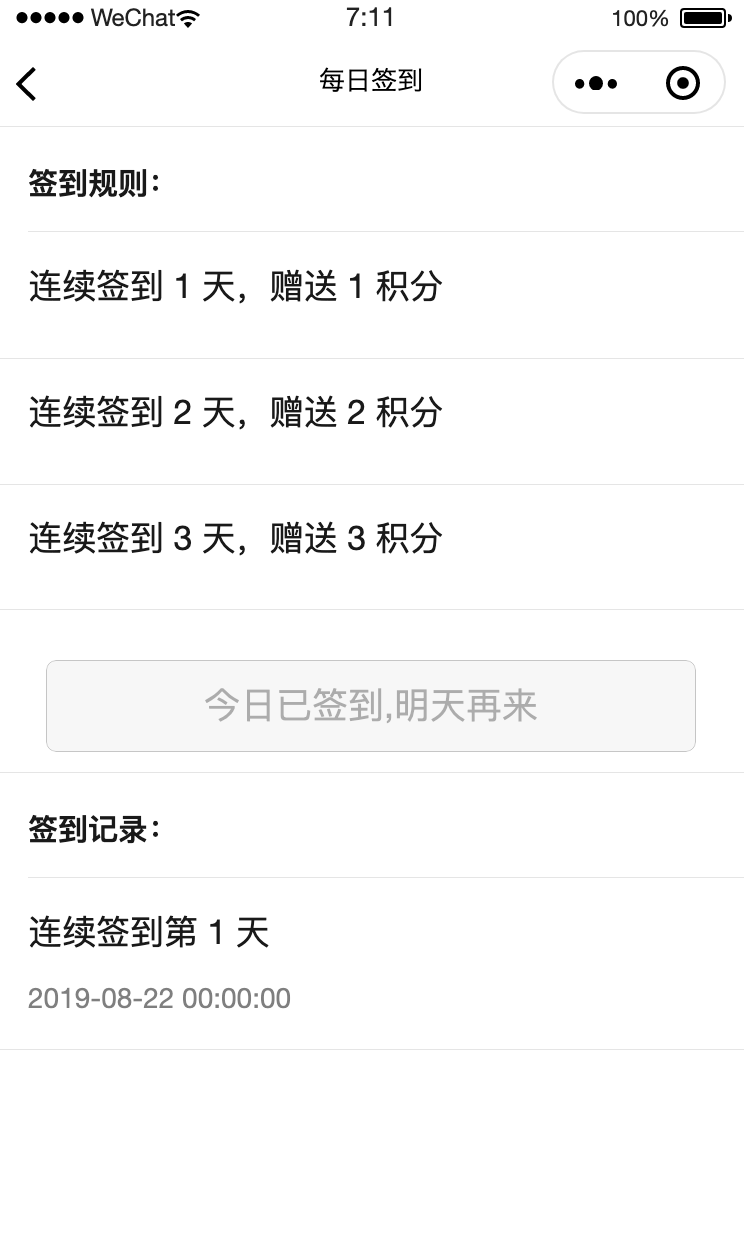
```plainSign-in rules:Sign in for {{ item.continuous }} days and receive {{ item.score }} points as a giftSign-in record:Continuous check-in day {{ item.continuous }}
{{ item.dateAdd }}
```
```javascript
const WXAPI = require('apifm-wxapi')
Page({
data: {
scoreSignRules: undefined, // Rules for signing in and giving away points
scoreSignLogs: undefined, // Sign-in record
todaySigned: true, // Whether you have signed in today
},
onLoad: function (options) {
},
onShow: function () {
this.scoreSignRules()
const loginToken = wx.getStorageSync('loginToken')
if (!loginToken) {
wx.showToast({
title: 'Please log in first',
icon: 'none'
})
this.goRegist()
return
}
this.scoreTodaySignedInfo()
this.scoreSignLogs()
},
goRegist() {
wx.navigateTo({
url: '/pages/auth/index'
})
},
scoreSignRules(){ // Read the sign-in bonus point rules
WXAPI.scoreSignRules().then(res => {
if (res.code == 0) {
this.setData({
scoreSignRules: res.data
})
}
})
},
scoreSignLogs(){ // Read sign-in records
const loginToken = wx.getStorageSync('loginToken')
WXAPI.scoreSignLogs({
token: loginToken.token
}).then(res => {
if (res.code == 0) {
this.setData({
scoreSignLogs: res.data.result
})
}
})
},
scoreTodaySignedInfo(){ // Determine whether you have signed in today
const loginToken = wx.getStorageSync('loginToken')
WXAPI.scoreTodaySignedInfo(loginToken.token).then(res => {
if (res.code == 700) {
this.setData({
todaySigned: false
})
}
})
},
scoreSign(){ // Sign in
const loginToken = wx.getStorageSync('loginToken')
WXAPI.scoreSign(loginToken.token).then(res => {
if (res.code == 0) {
wx.showToast({
title: 'Sign in successfully',
icon: 'success'
})
this.setData({
todaySigned: true
})
this.onShow()
} else {
wx.showToast({
title: res.msg,
icon: 'none'
})
}
})
},
})
```
# apifm-wxapi method description
### Sign-in rules
```javascript
WXAPI.scoreSignRules()
```
> Read how many points you will get for signing in once; if you sign in for x consecutive days, you will get y points
>
### Sign in
```javascript
WXAPI.scoreSign(token)
```
### Read today’s check-in information
```javascript
WXAPI.scoreTodaySignedInfo(token)
```
> Determine whether you have signed in today
>
> If the error code returns 700, it means that you have not signed in; if the error code returns 0, it means you have signed in.
>
### Sign-in record
```javascript
WXAPI.scoreSignLogs(Object object)
```
> Read historical check-in records
>
> Display in pages. Please refer to the interface documentation for specific parameters.
>
**For more detailed parameter usage and more advanced advanced usage methods, please refer to the API interface documentation: **
["api interface document"](#)
_More usage methods about apifm-wxapi: _
["apifm-wxapi Instructions for Use"](https://github.com/gooking/apifm-wxapi/blob/master/instructions.md)
_Download the Demo code of this case: _
["apifm-wxapi using Demo program"](https://github.com/gooking/apifm-wxapi-demo)
Looking forward to your progress!
grateful!