# Preface
This tutorial is based on the "apifm-wxapi" module and teaches you how to quickly implement small program development, so you may need to understand the following knowledge points first:
["Creating HelloWorld Project"](https://www.yuque.com/apifm/doc/hezlrm)
["Use "apifm-wxapi" to quickly develop small programs"](https://www.yuque.com/apifm/doc/mdldsd)
["Register for free to open the backend and obtain an exclusive domain name"](https://www.yuque.com/apifm/doc/qr6l4m)
# Requirements description
The user accesses the mini program and clicks the registration button to complete the registration of a new user;
The background can view and manage registered users;
# budget
0 yuan, free implementation
# Requirements realization
### Preparation
Because this example is for mini program development, you must configure your mini program appid and secret in the background before performing the following work;
Because only if the correct mini program appid and secret are configured in the background, the background can correctly parse the encrypted user data submitted by the mini program to the api interface, and then the user registration can be completed.
["Appid and secret of background configuration applet"](https://www.yuque.com/apifm/doc/ngdgyi)
### Enable user management module
Log in to the "First Step" registration background, left menu --> Factory settings --> Module management
Find the "Mini Program User Registration and Login" module, click "Enable Module", then press F5 to refresh the background interface, and you will see a new menu: "User Management";
### Write small program code:
##### Simple registration process
> This registration process uses the WXAPI.register_simple(Object object) method and does not obtain the user's nickname and avatar.
>
```plain
const WXAPI = require('apifm-wxapi')
WXAPI.init('gooking')
Page({
data: {
},
onLoad: function (options) {
},
register(e){
if (!e.detail.userInfo) {
// You clicked to cancel authorization
return;
}
wx.login({
success: function (res) {
const code = res.code; // The code parameter returned by the WeChat login interface is needed for the following registration interface.
WXAPI.register_simple({
code: code
}).then(function (res) {
//Registration interface returns results
console.log(res)
})
}
})
}
})
```
> WXAPI.init('gooking') This code links your mini program to your backend, where gooking is your exclusive domain name (please check the chapter about exclusive domain names in the preface);
>
##### Detailed registration process
_If you have tested the simple registration above, and then test the detailed registration interface below, you will be prompted that the user already exists. You can go to the backend to delete the previously registered user, and then test the detailed registration method_
> The registration process uses the WXAPI.register_complex(Object object) method to obtain the user's nickname and avatar
>
```plain
const WXAPI = require('apifm-wxapi')
WXAPI.init('gooking')
Page({
data: {
},
onLoad: function (options) {
},
register(e) {
if (!e.detail.userInfo) {
// You clicked to cancel authorization
return;
}
wx.login({
success: function (res) {
const code = res.code; // The code parameter returned by the WeChat login interface is needed for the following registration interface.
wx.getUserInfo({
success: function (res) {
const iv = res.iv;
const encryptedData = res.encryptedData;
//Start calling the registration interface below
WXAPI.register_complex({
code: code,
encryptedData: encryptedData,
iv: iv
}).then(function (res) {
//Registration interface returns results
console.log(res)
})
}
})
}
})
}
})
```
> WXAPI.init('gooking') This code links your mini program to your backend, where gooking is your exclusive domain name (please check the chapter about exclusive domain names in the preface);
>
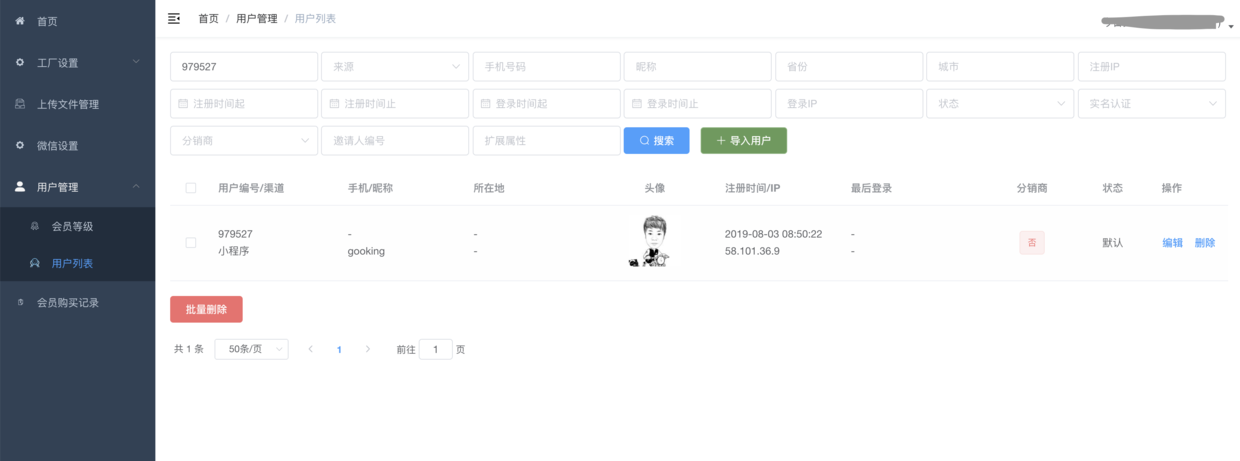
### Run the mini program and log in to the background to view users
Attached screenshots are as follows:
# Troubleshooting
["Registration/login failed, user openid cannot be obtained"](https://www.yuque.com/apifm/doc/qgzm02)
# Detailed description of parameters
You can view the parameter description document of this interface to implement more advanced functions:
["api interface document"](#)
# Thinking questions
Try to implement, user recommendation\invitation registration, establish hierarchical relationship between users
Looking forward to your progress!
grateful!