# Why do we need to mock data?
## Parallel development to improve efficiency
We all know that the development of a project requires front-end + back-end cooperation. Back-end programmers need to provide API interfaces for front-end development siege lions. Front-end development siege lions can use these interfaces to achieve the expected functions of the project.
When we usually develop projects, each team works in parallel. In order to reduce the dependency and waiting between each link, we need to do some data simulation in each link to achieve the purpose of parallel development.
Therefore, both parties in the early stage determined the URL path, request parameters, and return data structure of the api interface as quickly as possible. After confirmation, both parties can go their separate ways and complete their own tasks:
1. The back-end programmer implements the internal implementation of these interfaces;
2. Test students write test cases and automated test scripts according to the agreed parameters to prepare for the next step of testing;
3. Front-end siege lion, through the mock data, immediately start front-end development (website, small program, APP);
After the formal API interface is developed, you only need to change the mock domain name in front-end development to the development domain name for joint debugging, without modifying any other code on the front-end.
## Quickly build prototypes
In some application scenarios, customers do not have clear needs and currently have no idea of what the backend will be developed into. Therefore, it is still difficult for programmers to provide formal interfaces. Now the project urgently needs to prototype the front-end first, so that everyone can experience it online and make adjustments while experiencing it.
# How to mock data
## Build it yourself through nodejs
Install Node.js and start the local server through http-server
Get port http://localhost:8000
As well as many popular mock data js components, the essence is to start a web server locally where you are developing, and then your front end accesses your local web server.This method requires more tedious work for the front end. Mock data, interface addresses, and data structures are all maintained locally, which is not conducive to team assistance. Moreover, some front-end development (such as small program development, IOS development) must support the calling address of the API interface is https. So this method can only do some simple data mocking.## Mock data through online platform
This solution is more recommended for data mocking. You don’t need to build any mocking environment. You only need to access the online mocking platform provided by others. You only need to register an account, fill in the api interface address you expect, and the expected interface return content, and you can make calls on the front end.
At present, the most commonly used ones are easy-mock, fast-mock, mockhttp, and the mock modules provided by apifm.
I have been using the mock module provided by apifm for interface simulation, which has always been relatively stable and relatively fast (some of the others may need to circumvent the wall, which is a bit laggy~), so I also recommend everyone to use apifm. It can be used in a few simple steps.
The first step: register an API factory account for free. After registration, you are equivalent to having a cloud backend (complete with functions, such as cms, crm, mall, etc., can be developed online, but you don’t have to worry about so much, we only need to use its mock module);
Step 2: Factory settings -> Module management on the left, enable the mock module:

Refresh the background interface, and under the System Settings menu, you can see the mock application menu (it has a lot of modules, you can study it yourself if you have time~ We currently only need to use the mock module)
Step 3: Add and manage your own mock api:
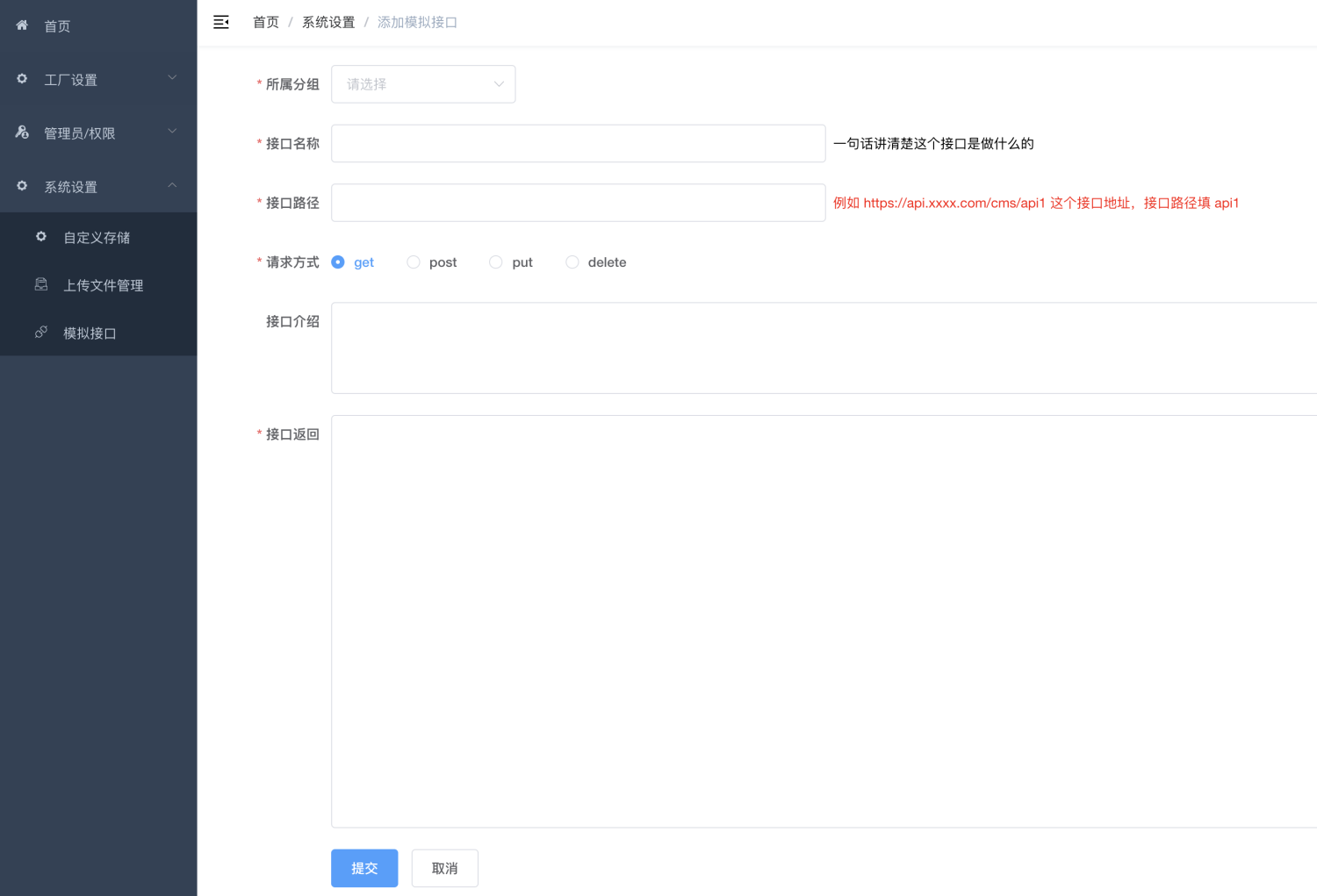
Anyone who is interested can try it~