# Preface
This tutorial is based on the "apifm-wxapi" module and teaches you how to quickly implement small program development, so you may need to understand the following knowledge points first:
["Creating HelloWorld Project"](https://www.yuque.com/apifm/doc/hezlrm)
["Use "apifm-wxapi" to quickly develop small programs"](https://www.yuque.com/apifm/doc/mdldsd)
["Register for free to open the backend and obtain an exclusive domain name"](https://www.yuque.com/apifm/doc/qr6l4m)
In this case, the "click to draw" function requires the user to log in before it can be operated, which means token authorization is required. Please understand first:
["WeChat Mini Program login to obtain openid and third-party tokens"](https://www.yuque.com/apifm/doc/kaygbw)
# Enable "online payment interface"
Log in to the "First Step" registration background, left menu --> Factory settings --> Module management
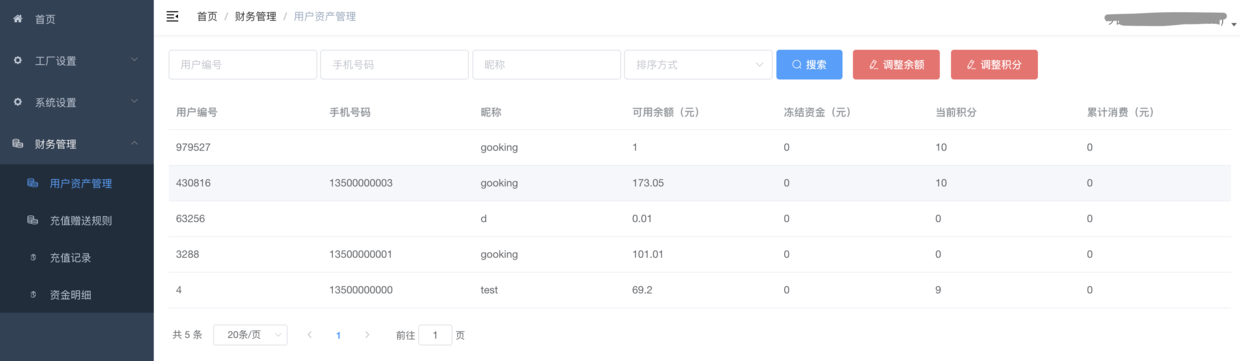
Find "Online Payment Interface", click "Enable Module", then F5 to refresh the background interface, you will see a new menu: "Financial Management" --> "User Asset Management";
**In this interface you will be able to manage the user's assets and adjust the user's balance and points information**
# Mini program development:
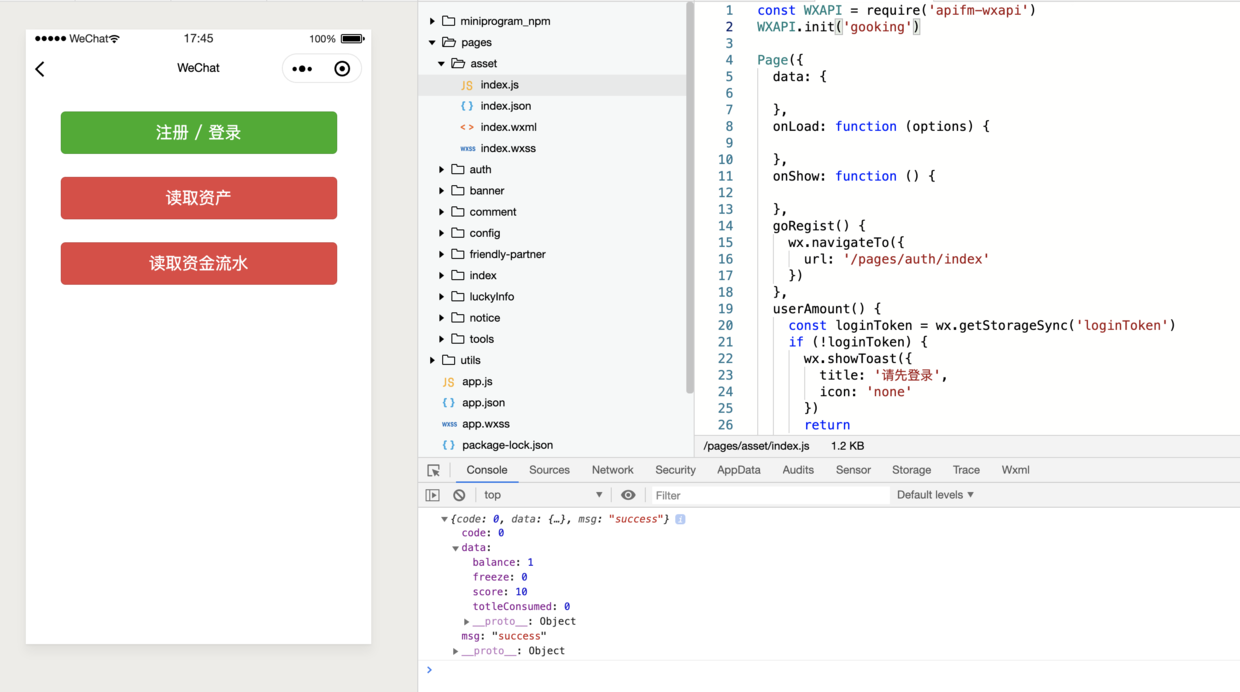
_When the interface returns, there is no rendering on the interface and the output is unified on the console. You can try to render the result data on the interface_
## Effect screenshot
## js file
```plain
const WXAPI = require('apifm-wxapi')
WXAPI.init('gooking')
Page({
data: {
},
onLoad: function (options) {
},
onShow: function () {
},
goRegist() {
wx.navigateTo({
url: '/pages/auth/index'
})
},
userAmount() {
const loginToken = wx.getStorageSync('loginToken')
if (!loginToken) {
wx.showToast({
title: 'Please log in first',
icon: 'none'
})
return
}
WXAPI.userAmount(loginToken.token).then(res => {
console.log(res)
if (res.code == 0) {
wx.showToast({
title: 'Read successfully',
icon: 'success'
})
} else {
wx.showToast({
title: res.msg,
icon: 'none'
})
}
})
},
cashLogs() {
const loginToken = wx.getStorageSync('loginToken')
if (!loginToken) {
wx.showToast({
title: 'Please log in first',
icon: 'none'
})
return
}
WXAPI.cashLogs({
token: loginToken.token
}).then(res => {
console.log(res)
if (res.code == 0) {
wx.showToast({
title: 'Read successfully',
icon: 'success'
})
} else {
wx.showToast({
title: res.msg,
icon: 'none'
})
}
})
},
})
```
## wxss file
```plain
button {
width:600rpx;
margin-top:50rpx;
}
```
## wxml file
```plain
```
> WXAPI.init('gooking') This code links your mini program to your backend, where gooking is your exclusive domain name (please check the chapter about exclusive domain names in the preface);
>
_So far, you have mastered how to add user asset functions to mini programs_
# Thinking questions
Reading the funds flow can achieve paged display. It is impossible to withdraw them all at once. Use your brain and try to realize the paged display of fund details:
_Parameters of the fund details method, you can check the following interface document for review: _
["api interface document"](#)
Looking forward to your progress!
grateful!