# After logging in to the backend, go to the left menu "Factory settings" --> "Module management" and find "System parameters” module, after enabling it, refresh the webpage with F5, and you will see the system parameter setting menu:

# Parameter configuration description
## Default global service fee for product profit sharing
**Parameter type:** Text parameter
**Parameter name:**GLOBAL_BENEFIT_PLATFORM_FEE
For example, if you plan to charge a 6% platform service fee, just fill in 6;
## Share the profit and freight to the store
**Parameter type:** Switch parameter
**Parameter name:**BENEFIT_PLATFORM_LOGISTICS_TO_SHOP
By default, shipping costs are not given to merchants. If necessary, just set this switch parameter.
## Allow users to publish products
**Parameter type:** Switch parameter
**Parameter name:**USER_PUBLISH_GOODS
Convenient for you to develop second-hand goods trading software
## User-published product settings are exempt from review
**Parameter type:** Switch parameter
**Parameter name:**USER_PUBLISH_GOODS_NO_NEED_VET
By default, products posted by users require background review. You can add this parameter to set the products released by users to be exempt from review and automatically put on shelves.
## Users publish cms articles without review
**Parameter type:** Switch parameter
**Parameter name: **cms_auto_vet_pass
By default, articles published by users require background review. You can set this parameter to allow users to publish cms articles without review and automatically publish them by adding this parameter.
## Users publish appointment registration without review
**Parameter type:** Switch parameter
**Parameter name:**yuyue_auto_vet_pass
By default, reservation registrations published by users require background review. You can add this parameter to automatically pass the review after publishing.
## Username registration login switch
**Parameter type:** Switch parameter
**Parameter name: **register.username.switch
Whether to enable username registration function
## Registered users automatically become distributors
**Parameter type:** Switch parameter
**Parameter name:**REGISTER_OPEN_SELLER
After turning on this setting, newly registered users will automatically become distributors without review. Please use with caution.
## Minimum recharge amount
**Parameter type:** Text parameter
**Parameter name: **recharge_amount_min
If set, recharge will not be possible if the amount is below this amount.
## Dada delivery merchant number
**Parameter type:** Text parameter
**Parameter name:**dada_merchant_id
If you want to enable Dada delivery, please configure your Dada merchant number
## Allow users to delete bargaining records themselves
**Parameter type:** Switch parameter
**Parameter name:**CUT_PRICE_MULTI
Applicable to users who need to clear bargaining records and re-initiate bargaining
## Enable cash on delivery
**Parameter type:** Switch parameter
**Parameter name: **pay_on_delivery_open_status
For usage tutorial, please ["click me to view"](https://www.yuque.com/apifm/doc/hagquy)
## Allow viewing friend details
**Parameter type:** Switch parameter
**Parameter name:**ALLOW_VIEW_FRIEND
Use of friend module
## Get any user information
**Parameter type:** Switch parameter
**Parameter name: **anonymous_user_info
Use of friend module
## Do you need to add friends before you can send messages?
**Parameter type:** Switch parameter
**Parameter name:**im_sendmessge_needfriend
Use of friend module
## After sending a message to the other party, you will automatically become their friend.
**Parameter type:** Switch parameter
**Parameter name:**im_sendmessge_autoTobeFriend
Use of friend module
## DingTalk reminder robot token
**Parameter type:** Text parameter
**Parameter name:**dingtalk_robot_token
Configure the DingTalk group robot secret key to facilitate push messages
## Whether duplicate real-name authentication is allowed
**Parameter type:** Switch parameter
**Parameter name:**IDCARD_ALLOW_MULTIPLE
By default, one ID number can only authenticate one user and cannot be repeated.
## Real-name authentication skip interface
**Parameter type:** Switch parameter
**Parameter name:**IDCARD_IGNORE_API
Real-name authentication skips public security API interface verification
## Default user extended attribute configuration
**Parameter type:** Text parameter
**Parameter name: **user.ext.fileds
## Default external data push extended attribute configuration
**Parameter type:** Text parameter
**Parameter name:**out.notify.ext
## Default external data push extended attribute configuration
**Parameter type:** Text parameter
**Parameter name:**out.notify.ext
## Set the background data to be cloned
**Parameter type:** Switch parameter
**Parameter name:**allow_public_copy
Once turned on, others will be able to actively clone your data
## The tax rate to be charged for the order
**Parameter type:** Text parameter
**Parameter name: **tax_percent
When placing an order, a certain percentage of the product price will be charged as tax.
## Immediate reminder for new orders
**Parameter type:** Switch parameter
**Parameter name: **sendWxCustomerMsgNopay
By default, the order will only be reminded when the order has been paid. By setting this parameter, as long as the order is placed, the reminder will be issued immediately.
## Balance consumption requires payment password
**Parameter type:** Switch parameter
**Parameter name:**balance_pay_pwdAfter turning on this setting, you must provide the payment password before using the available balance.
## Balance consumption requires SMS verification code
**Parameter type:** Switch parameter
**Parameter name:**balance_pay_sms_checkAfter turning on this setting, available balance consumption must be verified through SMS verification code.
## Close the message/comment function
**Parameter type:** Switch parameter
**Parameter name:**comment_closeAfter turning on this setting, the message/comment interface will be unavailable
## You can only get your own messages
**Parameter type:** Switch parameter
**Parameter name:**comment_only_selfAfter turning on this setting, the message/comment interface list interface will only return the message data submitted by itself.
## The delivery address requires real-name verification
**Parameter type:** Switch parameter
**Parameter name: **shipping-address-idcard-check
After turning on this setting, the user can add/modify the delivery address, name and ID number are required and must be filled in correctly.
Real-name authentication requires calling the real-name authentication interface for verification, so interface authentication fees will be incurred. You need to activate the "real-name authentication" module first and purchase the interface package for real-name authentication.
##Default inviter
**Parameter type:** Text parameter
**Parameter name:**DEFAULT_REFERRERWhen a user does not come in through someone else's invitation link, that is, when the user has no inviter, the system automatically assigns an inviting user. Fill in this parameter with a user ID
## View annual/daily sales on the front end
**Parameter type:** Switch parameter
**Parameter name:**statistics_saleroom_openAfter opening, you can use the front-end interface (/{domain}/site/statistics/saleroom/year) View annual sales data
## Users invited by non-distributor users belong to the upper-level distributor
**Parameter type:** Switch parameter
**Parameter name:**USER_INVITE_PARENT_SELLER##
## Global serial number ID reset time
**Parameter type:** Text parameter
**Parameter name: **order_sequence_hours
For example, the pickup number of the order, etc., you can set it to reset every 24 hours. If this parameter is not set, the system default is 6 hours
## Maximum number of consecutive check-in days
**Parameter type:** Text parameter
Parameter name: MAX_CONTINUOUS_SIGN_DAYS
The maximum number of consecutive check-in days. If the number exceeds this number, it will be treated as one consecutive check-in day.
## Three-level distribution team management, view team sales
**Parameter type:** Switch parameter
Parameter name: fx_members_show_cash
Once enabled, the sales status of team members will be returned.
## Email registered users do not need a verification code
**Parameter type:** Switch parameter
Parameter name: user_register_mail_no_code
After opening, the verification code will not be verified when registering a user with an email address.
## Whether to return the user's complete nickname and other information
**Parameter type:** Switch parameter
Parameter name: organize_view_memberInfo
If you do not open it, information such as nicknames will be desensitized.
## Turn off sensitive word detection when users publish cms articles
**Parameter type:** Switch parameter
Parameter name: sensitiveWordsNotCheck
## Default markup ratio for alliance products
**Parameter type:** Text parameter
Parameter name: UnionPriceDefaultPercent
Filling in 10 means a 10% increase in price
# How to limit the picture parameter to 1000 words:
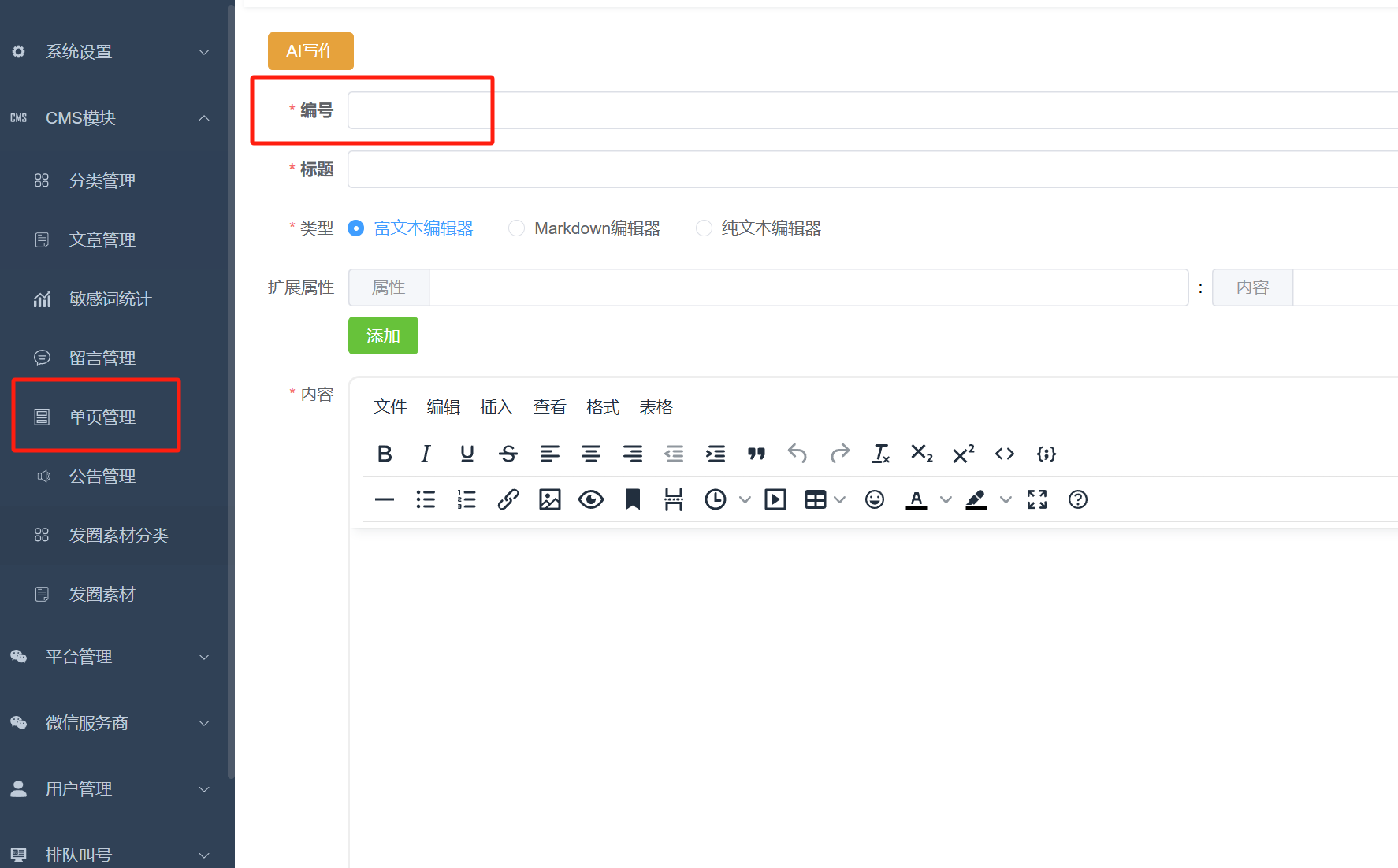
Maintain the content of the parameters in "Single Page Management" and choose the number as you like, for example: abcd1234
Then fill in the content of the system parameters `R_F_PAGE:abcd1234` That’s it