# Enable plugin
1. If you are a free member, it is a pity that you cannot use the plug-in function of apifm for the time being;
2. If you are a professional version member, then log in to the backend, go to the left menu "Factory settings" --> "Plugin management", find the "Organization/Members/Network Disk" plug-in, and purchase it online to activate it;
3. If you are a value-added member, you don’t need to do anything, you can use all plug-in functions for free;
# Activate module
"Factory settings" --> "Module management", search for "Organization/Members/Network Disk" and enable this module
# Configure the creation organization fee
Add the system parameter `organize_fee`, this price is the amount that needs to be paid when creating an organization;
After the payment is successful, the current user will be the administrator of the organization;
#Create organization
## Create an organization using balance payment
Call the interface `/organizeInfo/create` interface. For detailed interface parameter description, please see Frontend API docs
## Create an organization using online payments
When calling the online payment interface, pass the `nextAction` parameter: ["View tutorial"](https://www.yuque.com/apifm/doc/aetmlb)
Pass `{type:16, `priceId: 88`, name:'organization name'}`
+ priceId is the ID of the organization charging record set in the background
#Network disk function
## Network disk settings
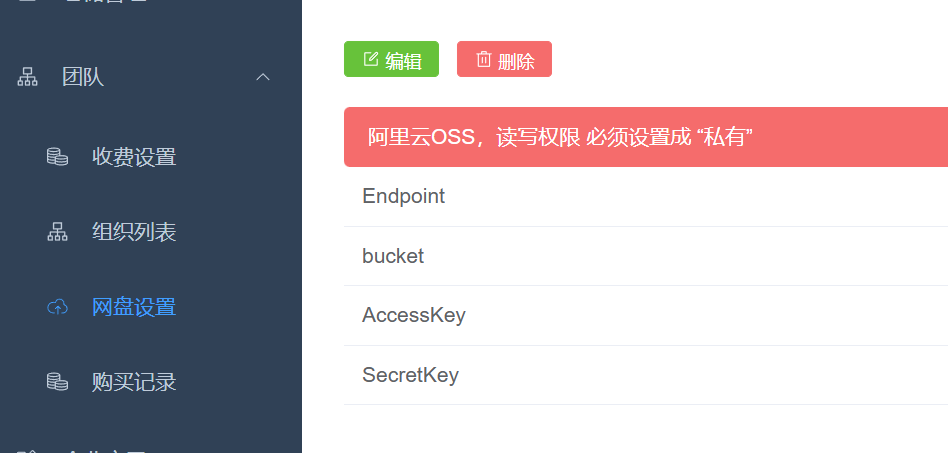
The network disk function relies on Alibaba Cloud's oss to achieve file sharing isolation between teams. You need to activate OSS in Alibaba Cloud first, and then complete the above configuration. Members within the organization can realize file sharing, uploading and downloading.
## File upload
[https://www.yuque.com/apifm/nu0f75/pdscmxb75bdst0pv](https://www.yuque.com/apifm/nu0f75/pdscmxb75bdst0pv)