# Download and install development tools:
[https://developers.weixin.qq.com/miniprogram/dev/devtools/download.html](https://developers.weixin.qq.com/miniprogram/dev/devtools/download.html)
# Get the test applet account:
Open the following address in your browser and scan the QR code on WeChat to quickly get the WeChat Mini Program test number
[https://developers.weixin.qq.com/sandbox](https://developers.weixin.qq.com/sandbox)
"If you already have a officially registered mini program account, just use your official appid and secret. You can skip this step."
#Create HelloWorld project:
Create a new test project on the development tool, as shown below
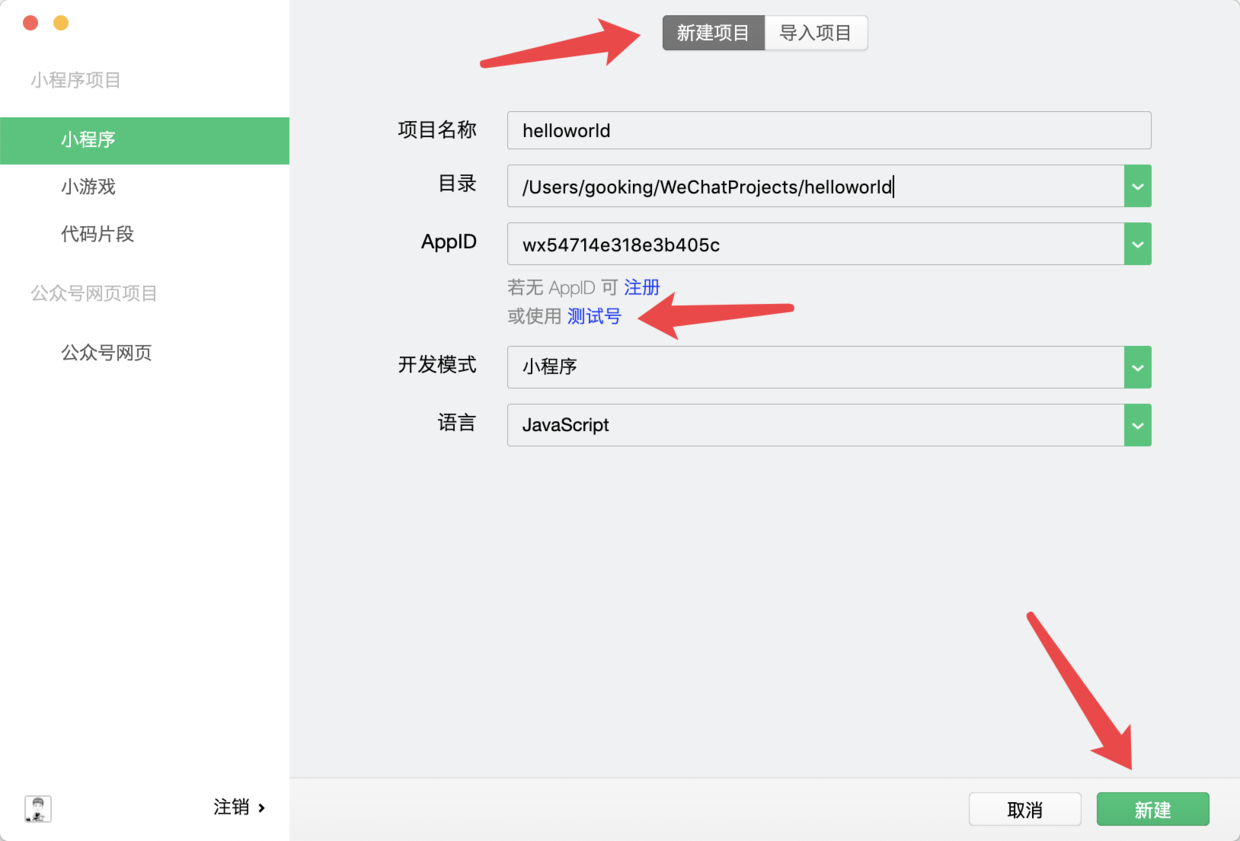
Create HelloWorld project
At this point, you have successfully created a project named "HelloWorld", which is saved in the computer directory: /Users/gooking/WeChatProjects/helloworld
(The path on everyone’s computer is different. You can specify the saving directory yourself when creating a project)
#Upgrade the project to npm project
WeChat Mini Program has fully supported npm. If you want to learn WeChat Mini Program development, installing third-party modules with npm is also a required course.
For a detailed introduction to npm for small programs, please view the following link:
[https://developers.weixin.qq.com/miniprogram/dev/devtools/npm.html](https://developers.weixin.qq.com/miniprogram/dev/devtools/npm.html)
## Check whether your computer has the npm development environment installed:
Open your terminal (Windows system is the dark DOS window, and mac system everyone knows what a terminal is~)
Enter the command in the terminal:
>npm -v>
You will be able to see the version number of your currently installed npm. If it prompts that the npm command is not found, it means that you have not installed npm. Please follow the following chapters to install npm.
## Install npm
Go to the official website ([https://nodejs.org/](https://nodejs.org/)) to download and install the version that suits you
You can also search on your own: "How to install npm environment"
At this point, I will assume that you have successfully installed npm ~
## Initialize npm project
Open your terminal (I have explained what a terminal is above, if you don’t understand, you can Baidu it yourself~)
Enter your mini program project directory, (the directory where the test project in this article is located is taken as an example, execute the following command:)
>cd /Users/gooking/WeChatProjects/helloworld>
Then execute the initialization npm command:
>npm init>
You can hit the Enter key all the way to the prompt information (in the last step, follow the prompts, you should enter yes and then press the Enter key), and finally you will be prompted that the initialization is successful.
At this point, there will be one more file "package.json" in your project directory.
If your operation is the same as mine, then congratulations, you succeeded!